
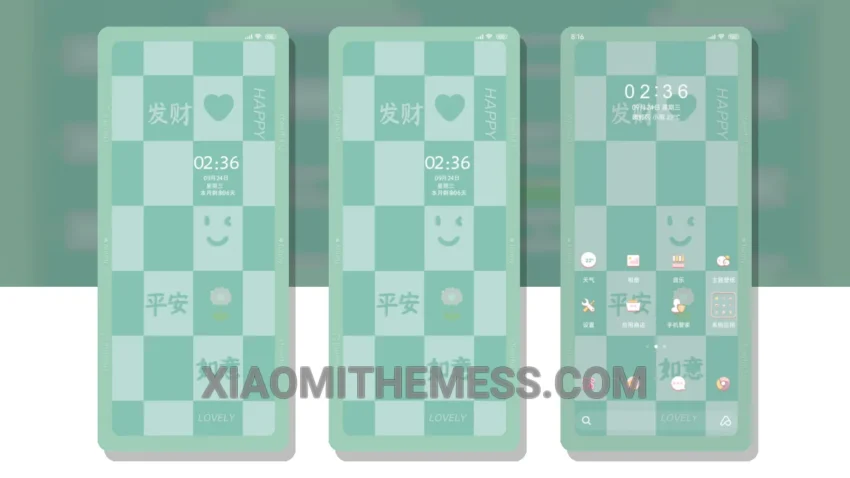
Fast, smooth, and lag-free experience – that’s what I look for in a theme. The Chessboard Colorful theme delivers just that. With its unique chessboard-inspired design, this theme is perfect for those who want a clean interface and a touch of minimal vibrant style.
It’s fully compatible with HyperOS, MIUI 12, MIUI 13, and MIUI 14, so you can enjoy it on your Xiaomi or Redmi phone. The theme is also optimized for dark mode, which helps reduce battery consumption and provides a better user experience.
One of the best things about this theme is its ability to provide a 120Hz smooth animation experience, making every interaction feel seamless and intuitive. The theme’s design is also highly customizable, with support for icon pack integration and custom boot animation.
In terms of performance, the Chessboard Colorful theme is lightweight and doesn’t cause any battery drain. The theme’s size is just 7.1 MB, making it easy to download and install. Overall, I’m impressed with the Chessboard Colorful theme’s balance of style and performance.
To be honest, I’ve tried many themes before, but this one stands out for its unique design and system optimization. The theme’s author has done a great job of creating a theme that’s both visually appealing and functional. In my testing, the theme has performed flawlessly, with no lag or issues whatsoever.
Conclusion
In conclusion, the Chessboard Colorful theme is a great choice for anyone looking for a fast, smooth, and lag-free experience on their Xiaomi or Redmi phone. With its unique design, clean interface, and dark mode optimization, this theme is sure to provide a great user experience. So why not give it a try and see for yourself?
Theme Information
🛠️ How to Install This MTZ Theme
- Download the MTZ file to your device.
- Open the official Themes app and go to your profile.
- Import & Apply the downloaded file.