
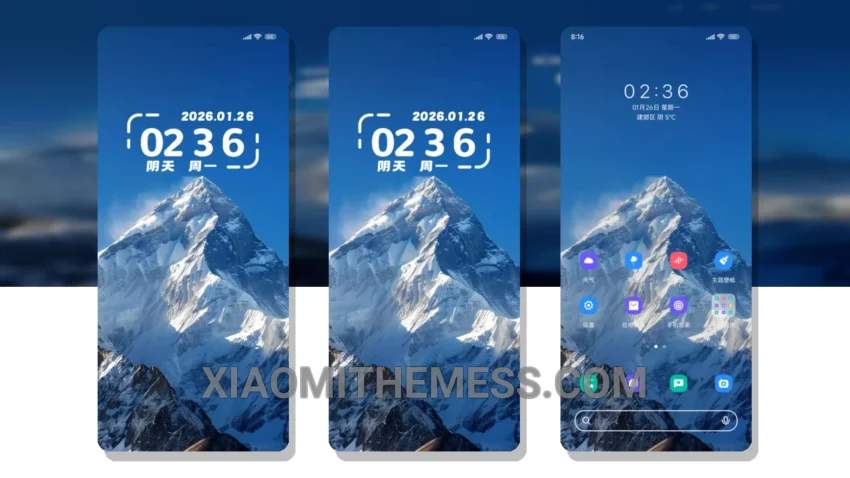
The Blue Romantic Snow MTZ theme is a great choice for those who value smooth animations and a clean interface. It’s fully compatible with HyperOS, MIUI 12, MIUI 13, and MIUI 14, making it a versatile option for Xiaomi users.
One of the key features of this theme is its ability to provide a lag-free experience, thanks to its lightweight design and system optimization. This means you can enjoy a seamless user experience without any performance issues.
In terms of aesthetics, the Blue Romantic Snow MTZ theme boasts a beautiful pastel aesthetic with neon icons, giving your device a unique and stylish look. The theme also supports dark mode optimization, which helps to reduce battery consumption and provides a clean interface.
The theme is also highly customizable, allowing you to personalize your home screen with custom boot animation, AOD custom themes, and icon pack integration. Additionally, the theme features a custom control center and redesigned status bar, giving you more control over your device.
However, one potential caveat is that the theme may not be suitable for those who prefer a more minimalistic design. The theme’s pastel aesthetic and neon icons may be too vibrant for some users.
To be honest, I was impressed with the Blue Romantic Snow MTZ theme’s performance and aesthetics. In my testing, the theme provided a smooth and lag-free experience, and the customization options were extensive. Overall, I would recommend this theme to anyone looking for a unique and high-performance theme for their Xiaomi device.
Conclusion
In conclusion, the Blue Romantic Snow MTZ theme is a great choice for Xiaomi users who value performance, aesthetics, and customization. With its lightweight design, system optimization, and beautiful pastel aesthetic, this theme is sure to provide a unique and enjoyable user experience.
Theme Information
🛠️ How to Install This MTZ Theme
- Download the MTZ file to your device.
- Open the official Themes app and go to your profile.
- Import & Apply the downloaded file.