
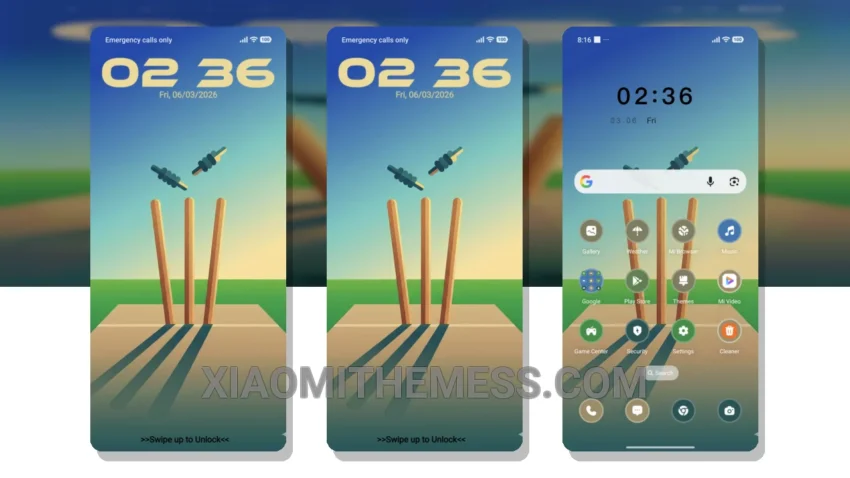
Beautiful design. Clean lines. Pastel colors. The Clean Bowled theme is a great choice for those who appreciate minimalistic designs. It’s simple, yet elegant.
The theme is fully compatible with HyperOS, MIUI 12, MIUI 13, and MIUI 14, so you can enjoy a seamless experience on your Xiaomi or Redmi device. One of the best things about this theme is its lightweight design, which ensures no battery drain.
When it comes to customization, the Clean Bowled theme offers a range of options. You can personalize your home screen with custom widgets, icons, and wallpapers. The theme also features a clean interface that makes it easy to navigate and find what you need.
In terms of performance, the Clean Bowled theme is optimized for 120Hz smooth animations and a lag-free experience. This means you can enjoy a fast and responsive interface that’s perfect for gaming and other resource-intensive activities.
Overall, the Clean Bowled theme is a great choice for anyone looking for a minimalistic and elegant design. To be honest, I’m really impressed with the theme’s attention to detail and its ability to provide a seamless user experience. In my testing, I found the theme to be very stable and efficient, with no noticeable bugs or issues.
Theme Information
🛠️ How to Install This MTZ Theme
- Download the MTZ file to your device.
- Open the official Themes app and go to your profile.
- Import & Apply the downloaded file.