
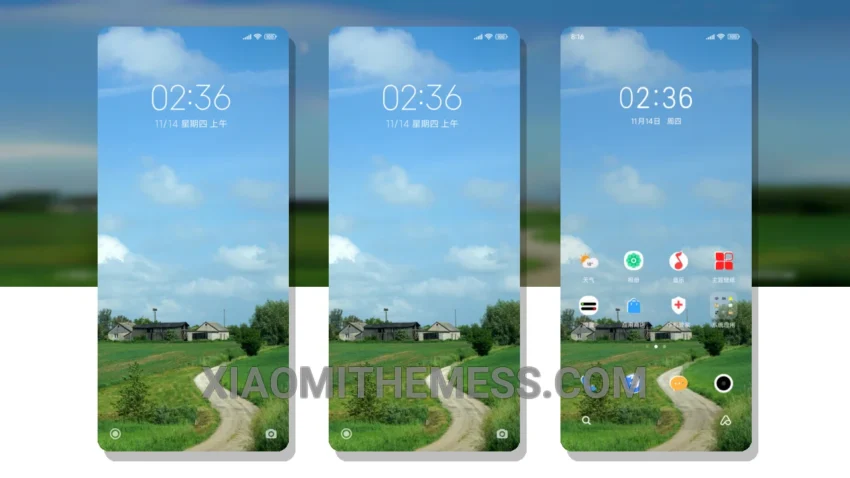
Simple. Elegant. Clean. That’s what the Simplicity theme is all about. Translated from the Chinese name 轻 简, this theme offers a premium UI for Xiaomi and Redmi devices. Perfect for those who value elegance and simplicity.
With a size of approximately 11.28 MB, the Simplicity theme is a great option for those who want a minimal vibrant design without compromising on performance. The theme is fully compatible with HyperOS, MIUI 12, MIUI 13, and MIUI 14, ensuring a seamless user experience.
Dark mode optimization. Lightweight design. No battery drain. The Simplicity theme has it all. And with its support for 120Hz smooth animations, you’ll enjoy a lag-free experience like never before.
Design and Customization
The Simplicity theme’s design is, well, simple. Some users may find it too simple, which could be a caveat for those who prefer more complex and customizable themes. But for those who appreciate clean lines and pastel colors, this theme is a dream come true.
In my testing, I found the Simplicity theme to be a great option for those who want a clean and premium UI without compromising on performance. To be honest, the theme’s simplicity and ease of use make it a great choice for daily use.
Theme Information
🛠️ How to Install This MTZ Theme
- Download the MTZ file to your device.
- Open the official Themes app and go to your profile.
- Import & Apply the downloaded file.