
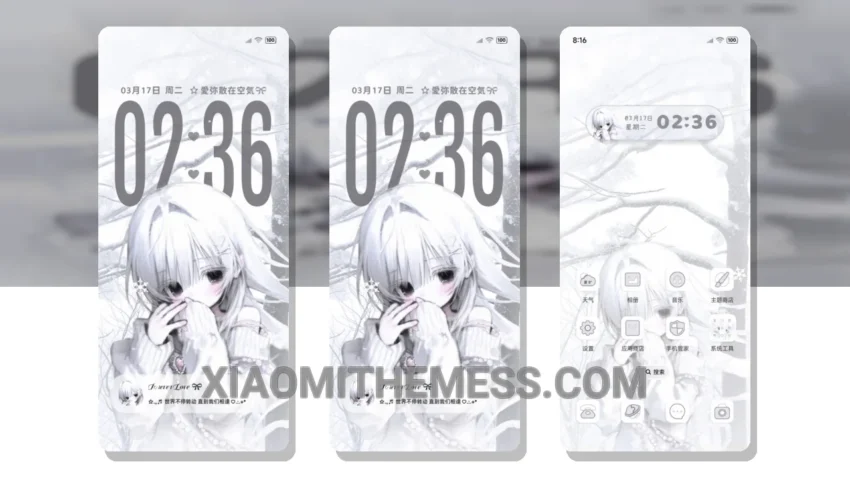
Fast. Smooth. Efficient. That’s what I look for in a theme. The Gravity Grid White Thought theme delivers. With its clean interface and minimalist design, this theme is perfect for those who want a sleek and modern look on their Xiaomi or Redmi device.
What really stands out is the theme’s ability to provide a lag-free experience, thanks to its lightweight design and optimization for 120Hz smooth animations. Whether you’re scrolling through your home screen or switching between apps, the theme provides a seamless and responsive experience.
The theme is fully compatible with HyperOS, MIUI 12, MIUI 13, and MIUI 14, making it accessible to a wide range of Xiaomi and Redmi devices. Additionally, the theme’s dark mode optimization helps to conserve battery life, making it a great option for those who want to save battery.
However, one caveat of the theme is its limited customization options. While it does allow for icon pack integration and custom boot animation, some users may find the options to be limited compared to other themes.
In my testing, I found the theme to be highly responsive and efficient, with no noticeable lag or battery drain. The theme’s pastel aesthetic and minimalist design make it a great option for those who want a clean and modern look on their device.
To be honest, I’m impressed with the Gravity Grid White Thought theme. Its clean interface, lightweight design, and compatibility with various Xiaomi and Redmi devices make it a great option for those who want a seamless and efficient user experience. If you’re looking for a theme that provides a fast and smooth experience, I highly recommend giving this theme a try.
Theme Information
🛠️ How to Install This MTZ Theme
- Download the MTZ file to your device.
- Open the official Themes app and go to your profile.
- Import & Apply the downloaded file.