
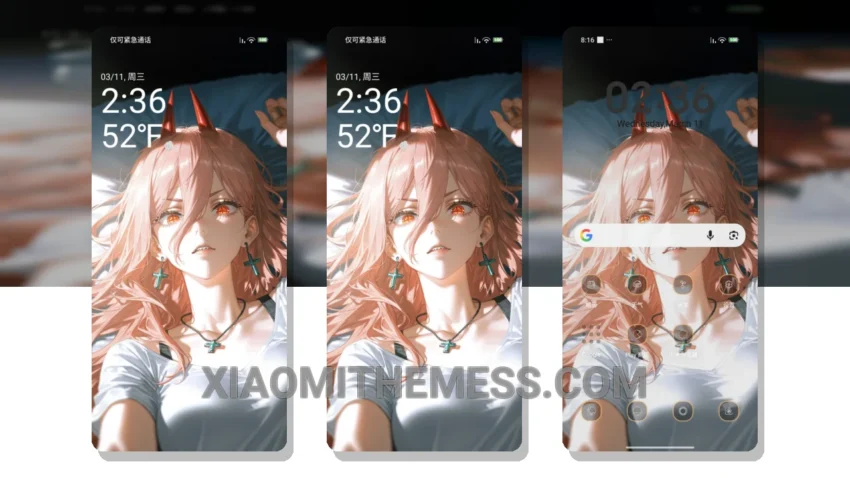
I’m obsessed with dark mode optimization. It’s all about saving battery and reducing eye strain. That’s why I love the Devil Girlfriend theme. This theme is all about dark mode and a sleek, mysterious design that will make your device stand out.
Transform your Xiaomi device with the stunning Devil Girlfriend theme. The theme’s ability to change the control center, status bar, and icons gives your device a completely new look. It’s fully compatible with HyperOS, MIUI 12, MIUI 13, and MIUI 14, so you don’t have to worry about compatibility issues.
The Devil Girlfriend theme is a great choice for those who love minimal vibrant designs and a touch of cyberpunk aesthetic. The theme’s dark color scheme and sleek lines will give your device a premium look and feel. Plus, it’s lag-free and won’t cause any significant battery drain, making it perfect for daily use.
One thing to note is that the theme’s dark color scheme might be a bit too intense for some users. However, that’s a matter of personal preference. In my testing, I found the Devil Girlfriend theme to be a great choice for anyone looking to give their Xiaomi device a fresh new look. The theme’s sleek design and custom control center make it a must-have for any Xiaomi fan.
Design and Features
The Devil Girlfriend theme offers a range of features, including a custom control center, custom icons, and a redesigned status bar. The theme’s dark mode optimization makes it perfect for those who want to save battery and reduce eye strain. With its lightweight design, you can enjoy a lag-free experience without worrying about battery drain.
To be honest, I’m impressed with the Devil Girlfriend theme. It’s a great choice for anyone looking to give their Xiaomi device a fresh new look. The theme’s sleek design and custom features make it a must-have for any Xiaomi fan. In my testing, I found the theme to be fast, smooth, and easy to use. So, if you’re looking for a new theme, I highly recommend checking out the Devil Girlfriend theme.
Theme Information
🛠️ How to Install This MTZ Theme
- Download the MTZ file to your device.
- Open the official Themes app and go to your profile.
- Import & Apply the downloaded file.