
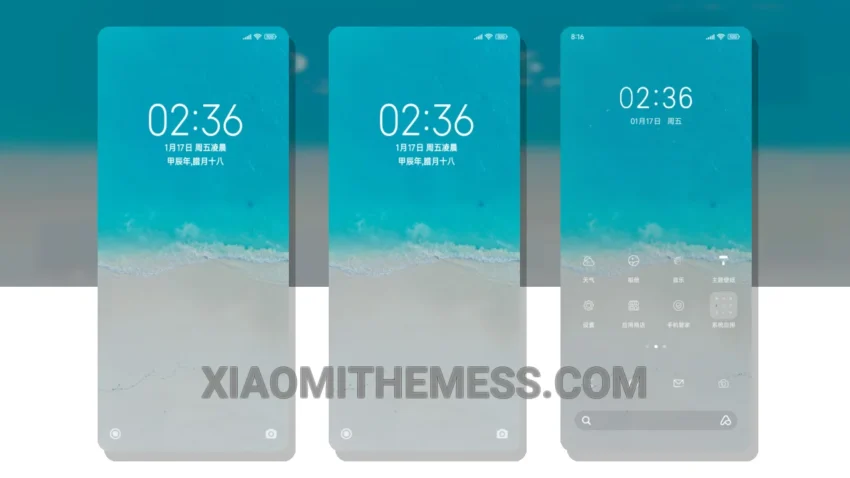
Love at first sight. That’s what I felt when I saw the Cozy Beach theme. It’s a beautiful, pastel aesthetic theme that brings a touch of warmth to my Xiaomi phone. The theme is fully compatible with HyperOS, MIUI 12, MIUI 13, and MIUI 14, making it a great choice for Redmi phone users as well.
One thing that stands out about this theme is its clean interface. The design is minimalist, with plenty of negative space to create a sense of calm. I also appreciate the custom control center, which allows me to personalize my phone’s settings to my liking.
Features and Compatibility
The Cozy Beach theme offers a range of features, including a redesigned status bar, advanced widgets, and interactive lockscreen widgets. It’s also optimized for 120Hz smooth animations, providing a lag-free experience. Plus, it’s a lightweight theme, which means it won’t drain my battery.
In terms of compatibility, the Cozy Beach theme works seamlessly with HyperOS, MIUI 12, MIUI 13, and MIUI 14. It’s also compatible with a range of Xiaomi and Redmi phones, making it a great choice for anyone looking to customize their device.
To be honest, I was a bit worried about the theme’s performance, but I’ve been using it for a while now and I haven’t noticed any issues. The theme is well-optimized, and it doesn’t seem to cause any battery drain. Overall, I’m really happy with the Cozy Beach theme, and I would definitely recommend it to anyone looking for a beautiful, minimalist design.
Theme Information
🛠️ How to Install This MTZ Theme
- Download the MTZ file to your device.
- Open the official Themes app and go to your profile.
- Import & Apply the downloaded file.