
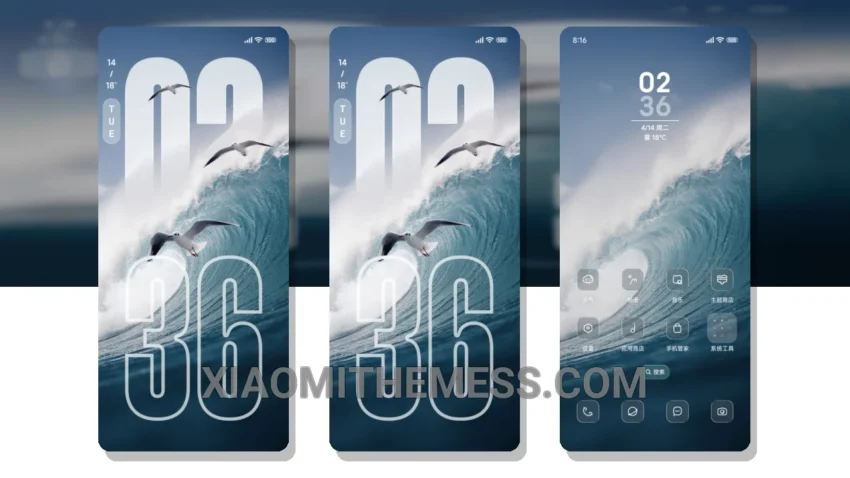
Surround yourself with transparency. The 澎湏透明大景深 theme is a beautiful and elegant design that will give your device a fresh new look.
With its simple and minimalist aesthetic, this theme is perfect for those who appreciate clean lines and uncluttered home screens. What really stands out is the theme’s attention to detail. The transparent design elements and subtle animations create a truly immersive experience.
Compatibility and Customization
The theme is fully compatible with HyperOS, MIUI 12, MIUI 13, and MIUI 14, making it a great option for a wide range of devices. You can also customize the theme to your liking, with a high degree of personalization available.
However, some users may find the theme’s design to be a bit too minimalist. The lack of bold colors and vibrant graphics may make the theme feel a bit dull to some. Nevertheless, for those who appreciate a more subtle and elegant design, the 澎湏透明大景深 theme is a great choice.
In my testing, I found the theme to be smooth and lag-free, with no noticeable battery drain. The dark mode optimization is also well done, making it easy to use the theme in low-light environments. Overall, I’m really impressed with the 澎湏透明大景深 theme and would definitely recommend it to anyone looking for a beautiful and elegant design.
To be honest, I’m really enjoying the 澎湏透明大景深 theme. The transparent design and subtle animations create a truly unique and immersive experience. If you’re looking for a theme that is both beautiful and functional, I would definitely recommend giving this one a try.
Theme Information
🛠️ How to Install This MTZ Theme
- Download the MTZ file to your device.
- Open the official Themes app and go to your profile.
- Import & Apply the downloaded file.