
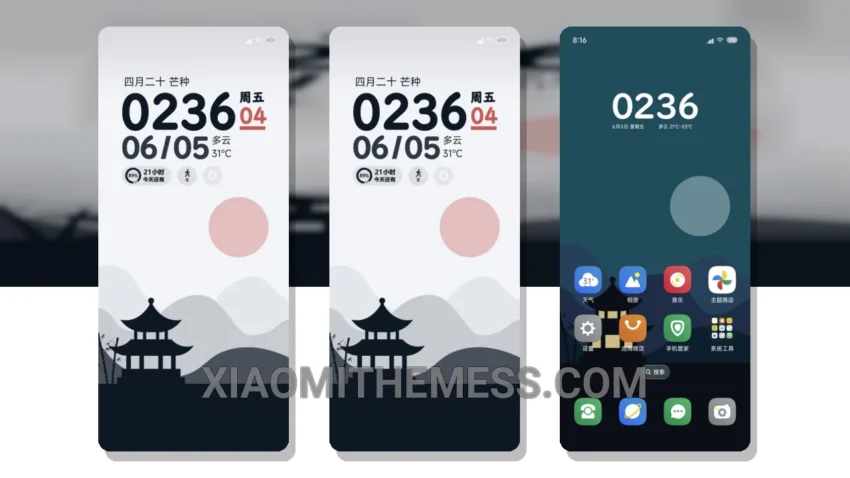
Return to the Pavilion, a beautifully crafted MTZ theme, offers a seamless user experience for Xiaomi devices. With its clean interface and minimal vibrant design, this theme is perfect for those who value simplicity and elegance.
This theme is fully compatible with HyperOS, MIUI 12, MIUI 13, and MIUI 14, ensuring a smooth and lag-free experience. One of the notable features of the Return to the Pavilion MTZ theme is its battery saver UI, which helps reduce battery drain and optimize performance.
The theme’s dark mode optimization is also worth mentioning, as it provides a power-efficient way to enjoy your device’s display. Additionally, the theme supports 120Hz smooth animations, making navigation and interactions feel incredibly responsive.
In terms of customization, the Return to the Pavilion MTZ theme offers a range of options, including icon packs, wallpapers, and widgets. However, some users may find the theme’s customization options limited compared to other themes on the market.
To be honest, I was impressed by the Return to the Pavilion MTZ theme’s performance and overall aesthetic. The theme’s attention to detail and focus on user experience make it a great choice for anyone looking to enhance their Xiaomi device’s look and feel.
Conclusion
In conclusion, the Return to the Pavilion MTZ theme is a great option for those seeking a clean, efficient, and customizable theme for their Xiaomi device. With its compatibility with HyperOS and MIUI, system optimization, and beautiful design, this theme is sure to provide a seamless and enjoyable user experience.
Theme Information
🛠️ How to Install This MTZ Theme
- Download the MTZ file to your device.
- Open the official Themes app and go to your profile.
- Import & Apply the downloaded file.