
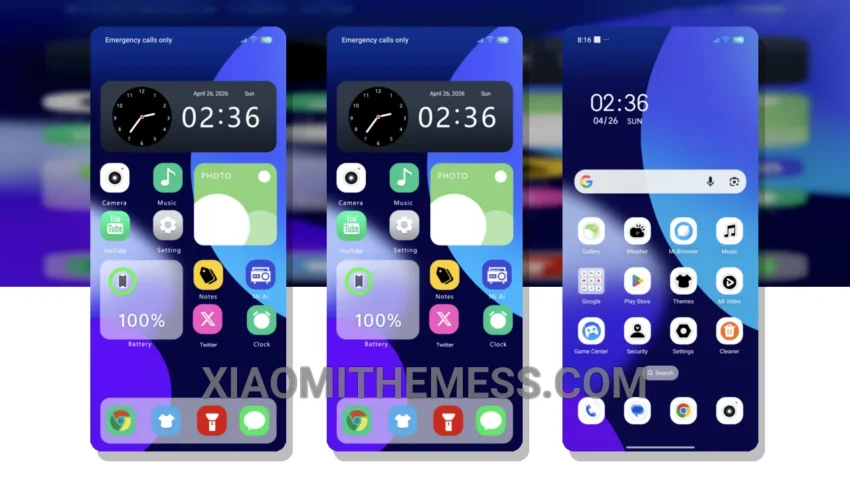
Dark mode just got a whole lot better. Reduced Pattern theme is here, and it’s a game-changer. This theme is all about elegance and simplicity, with a dark mode experience that’s both sleek and sophisticated.
One of the best things about the Reduced Pattern theme is its compatibility. It works seamlessly with HyperOS, MIUI 12, MIUI 13, and MIUI 14, so you can enjoy a consistent look and feel across all your devices.
When it comes to customization, the Reduced Pattern theme has got you covered. With support for icon pack integration, you can personalize your home screen to your heart’s content. Plus, the theme’s lightweight design means it won’t slow down your device or cause battery drain.
Key Features
The Reduced Pattern theme boasts a range of impressive features, including 120Hz smooth animations, a lag-free experience, and system optimization for a performance boost. The theme also supports Glassmorphism UI, giving your device a premium look and feel.
In terms of aesthetics, the Reduced Pattern theme is all about minimal vibrant design. The pastel aesthetic themes and retro pixel art elements add a touch of nostalgia to your device, while the cyberpunk aesthetic and neon icons give it a futuristic edge.
Of course, no theme is perfect, and the Reduced Pattern theme is no exception. One potential caveat is that it may not be suitable for devices with low-resolution displays, as the theme’s graphics and animations may not render as smoothly.
To be honest, I’m loving the Reduced Pattern theme on my device. The dark mode optimization is top-notch, and the theme’s overall design is both sleek and sophisticated. If you’re looking for a theme that’s both functional and visually stunning, the Reduced Pattern theme is definitely worth checking out.
Theme Information
🛠️ How to Install This MTZ Theme
- Download the MTZ file to your device.
- Open the official Themes app and go to your profile.
- Import & Apply the downloaded file.