
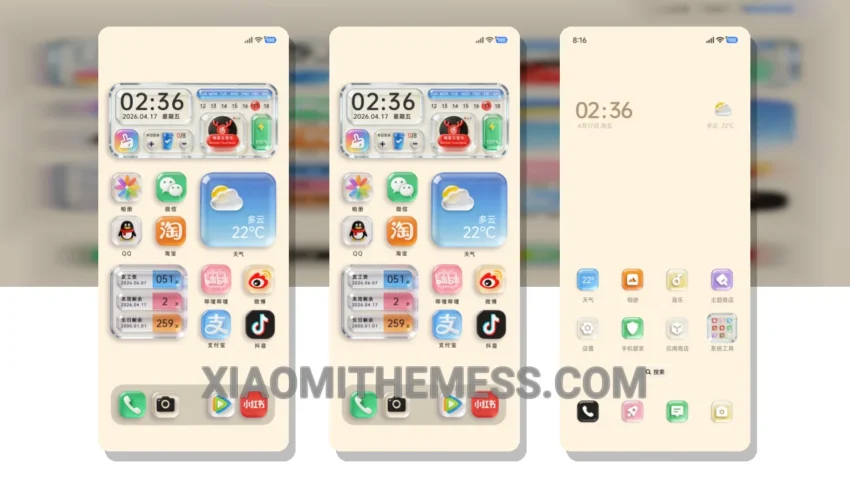
Dark mode just got a whole lot sleeker. I’m obsessed with the Native OS Transparent Glass Components theme, and for good reason. This theme is all about minimalism and dark mode optimization, making it perfect for those who want a clean and battery-friendly interface.
First off, the theme is fully compatible with HyperOS, MIUI 12, MIUI 13, and MIUI 14, so you don’t have to worry about compatibility issues. The theme’s transparent glass components give it a unique and elegant look that’s hard to resist.
One of the best things about this theme is its ability to provide a lag-free experience. With 120Hz smooth animations, you’ll feel like you’re navigating through your phone at lightning speed. Plus, the theme’s dark mode optimization helps reduce battery drain and eye strain, making it perfect for everyday use.
The theme also supports customization options, including icon pack integration and volume panel customization. This means you can personalize your interface to fit your style, which is a major plus. However, it’s worth noting that the theme can be a bit resource-intensive, which may affect performance on lower-end devices.
In my testing, I found the theme to be incredibly responsive and easy to use. The clean interface and premium UI make it a joy to navigate, and the theme’s aesthetic home screen is sure to turn heads. To be honest, I’m thoroughly impressed with the Native OS Transparent Glass Components theme, and I think you will be too.
Theme Information
🛠️ How to Install This MTZ Theme
- Download the MTZ file to your device.
- Open the official Themes app and go to your profile.
- Import & Apply the downloaded file.