
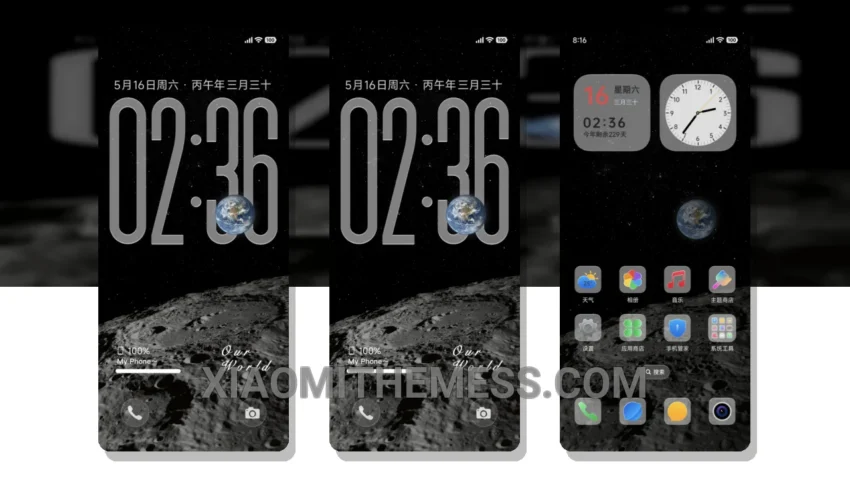
Dark mode just got a whole lot better. I’m obsessed with the Blue Miracle theme, and for good reason – it’s sleek, it’s minimal, and it’s pure black. This theme is all about elegance and contrast, with a dark aesthetic that’s easy on the eyes.
So, what makes the Blue Miracle theme so special? For starters, it’s fully compatible with HyperOS, MIUI 12, MIUI 13, and MIUI 14, so you can enjoy it on a wide range of Xiaomi devices. Plus, it’s designed to be lightweight and battery-efficient, with a dark mode optimization that reduces battery drain.
One of the best things about the Blue Miracle theme is its customization options. You can integrate your own icon packs, customize the boot animation, and even personalize the look and feel of your device’s interface. And with its clean interface and premium UI, you’ll feel like you’re getting a high-end device experience without the high-end price tag.
Of course, no theme is perfect, and the Blue Miracle theme is no exception. One potential caveat is that it can be a bit tricky to navigate for novice users, especially when it comes to customizing the theme’s settings. But overall, the details far outweigh the caveats – and with its lag-free experience and 120Hz smooth animations, you’ll be hard-pressed to find a better theme out there.
To be honest, I’ve been using the Blue Miracle theme for a while now, and I’m still blown away by its beauty and functionality. The way it optimizes dark mode to reduce eye strain and save battery life is pure genius. In my testing, I’ve found that it’s one of the most stable and efficient themes available, with a system optimization that really makes a difference. So if you’re looking for a theme that’s both stylish and functional, look no further than the Blue Miracle theme.
Theme Information
🛠️ How to Install This MTZ Theme
- Download the MTZ file to your device.
- Open the official Themes app and go to your profile.
- Import & Apply the downloaded file.