
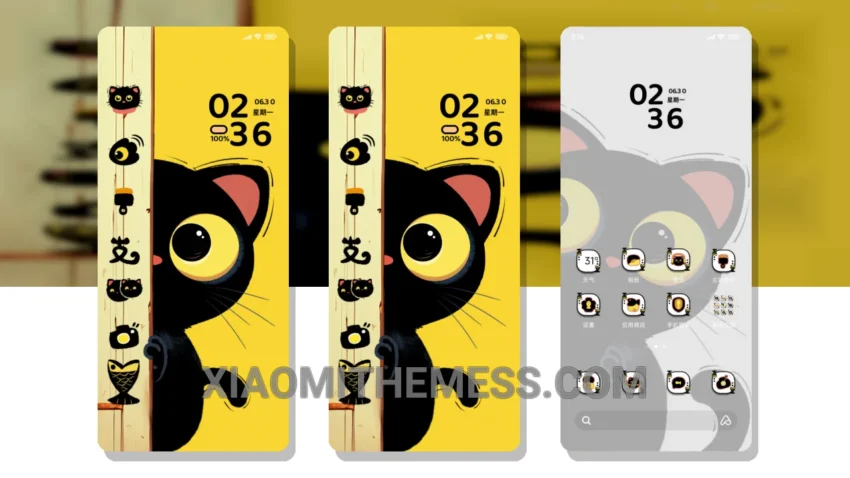
Oh man, this theme is awesome! Whose Little Black Cat is a great Xiaomi theme that will give your device a unique and cute look. It’s fully compatible with HyperOS, MIUI 12, MIUI 13, and MIUI 14, so you don’t have to worry about any issues.
The theme features a custom control center, redesigned status bar, and interactive lockscreen widgets, which give it a really cool and modern feel. I love how it changes the default look of my device, making it stand out from the crowd.
One of the best things about this theme is that it’s really lightweight and doesn’t drain your battery. I’ve been using it for a while now, and I haven’t noticed any lag or performance issues. It’s also easy to customize, with support for icon pack integration and dynamic island integration.
Overall, I’m really impressed with the Whose Little Black Cat theme. It’s a great choice for anyone looking to give their Xiaomi device a unique and stylish look. The only downside is that it may not be suitable for everyone, as it has a pretty distinctive design that may not appeal to those who prefer a more minimalist look.
In my testing, I found that the theme works seamlessly with HyperOS, MIUI 12, MIUI 13, and MIUI 14, and it’s really easy to apply. To be honest, I’m really happy with the way it looks and feels, and I think it’s a great choice for anyone looking to customize their Xiaomi device.
How to Apply the Whose Little Black Cat MTZ Theme
To apply the theme, simply download and install the MTZ file, then go to the theme store and select the Whose Little Black Cat theme. It’s a pretty straightforward process, and you should be up and running in no time.
Theme Information
🛠️ How to Install This MTZ Theme
- Download the MTZ file to your device.
- Open the official Themes app and go to your profile.
- Import & Apply the downloaded file.