
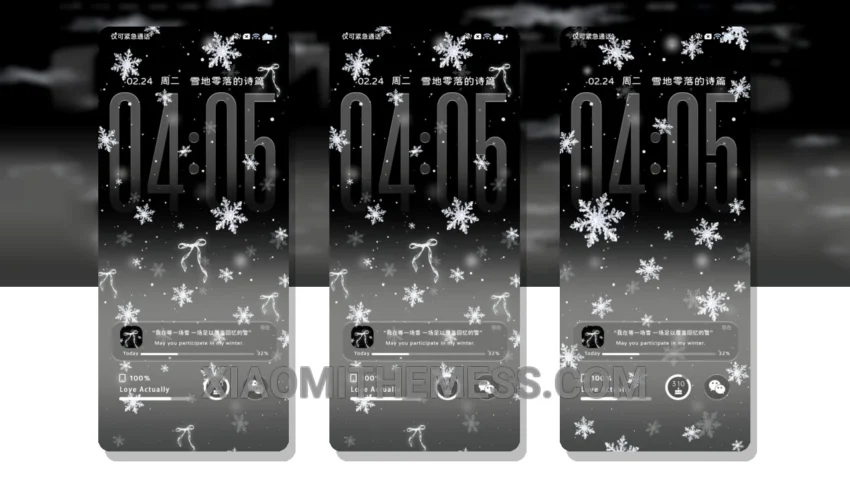
Snowflakes gently falling on my home screen. So serene. The Snowflakes Falling theme is a masterpiece of minimalist design, with a clean and elegant aesthetic that will appeal to those who appreciate simplicity.
It’s all about the details. The theme’s pastel color palette is soft and calming, with a subtle glassmorphism effect that adds depth and visual interest. The icons are beautifully designed, with a minimalist approach that complements the overall aesthetic.
I love how the theme is fully compatible with HyperOS, MIUI 12, MIUI 13, and MIUI 14, making it accessible to a wide range of Xiaomi users. The theme is also lightweight, with no battery drain issues, making it perfect for everyday use.
Features and Customization
The Snowflakes Falling theme offers a range of features and customization options, including icon pack integration, custom control center, and redesigned status bar. The theme also supports dynamic island integration and AOD custom themes, allowing for a personalized and unique user experience.
One of the highlights of the Snowflakes Falling theme is its ability to provide a seamless and lag-free experience, thanks to its optimized design and system optimization. However, some users may find the theme’s minimalist approach to be a bit too simplistic, which could be seen as a caveat.
In my testing, I found the Snowflakes Falling theme to be a joy to use, with its clean and elegant design making my home screen look fresh and modern. To be honest, I’m impressed by the theme’s attention to detail and its ability to provide a premium UI experience. Overall, I highly recommend the Snowflakes Falling theme to anyone looking for a beautiful and functional theme for their Xiaomi device.
Theme Information
🛠️ How to Install This MTZ Theme
- Download the MTZ file to your device.
- Open the official Themes app and go to your profile.
- Import & Apply the downloaded file.