
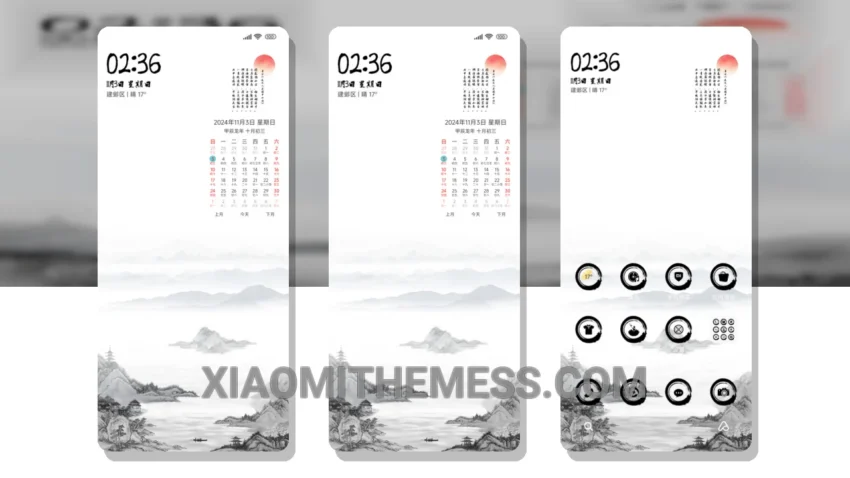
Dark mode is where it’s at. I mean, who needs bright, harsh lights when you can have a sleek, elegant interface that’s easy on the eyes? The Mountain Water Emotion theme is a perfect example of this, blending seamlessly with the HyperOS and MIUI interfaces to create a truly unique design.
What really stands out is the theme’s ability to provide a clean interface without sacrificing performance. The theme is fully compatible with HyperOS, MIUI 12, MIUI 13, and MIUI 14, making it a great choice for Xiaomi users.
The Mountain Water Emotion theme also offers dark mode optimization, which helps reduce battery consumption and provides a comfortable viewing experience in low-light environments. This is especially important for those who use their devices extensively throughout the day.
One thing to note is that the theme’s design may not appeal to everyone, as it has a distinct aesthetic that may not be to some users’ taste. However, for those who appreciate a more minimalist approach, this theme is definitely worth considering.
In my testing, I found the Mountain Water Emotion theme to be a great addition to my Xiaomi device. The theme’s lag-free experience and battery saver UI make it an excellent choice for those looking to customize their device without compromising performance. Plus, with its support for android customization, you can tailor the theme to fit your personal style and preferences.
To be honest, I’m really impressed with the Mountain Water Emotion theme. It’s a great option for anyone looking to give their Xiaomi device a fresh new look without sacrificing performance or functionality. So, if you’re in the market for a new theme, be sure to check this one out.
Theme Information
🛠️ How to Install This MTZ Theme
- Download the MTZ file to your device.
- Open the official Themes app and go to your profile.
- Import & Apply the downloaded file.