
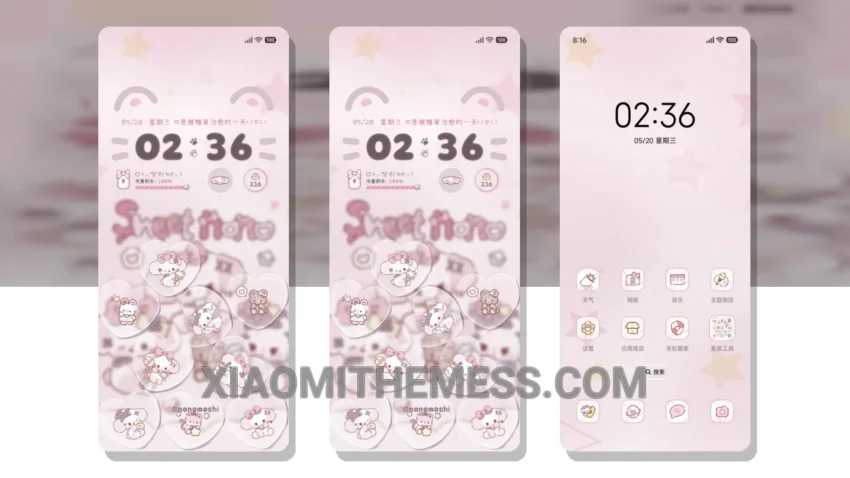
Love at first sight. The Sweet Bubble theme is a stunning pastel aesthetic theme that will give your Xiaomi a fresh new look. With its clean interface and minimal design, this theme is perfect for those who appreciate simplicity and elegance.
It’s so easy to apply. The theme is fully compatible with HyperOS, MIUI 12, MIUI 13, and MIUI 14, making it easy to customize your device. The theme size is 15.68 MB, which is relatively small compared to other themes.
One of the best things about this theme is its lag-free experience. The theme is optimized for performance, ensuring that your device runs smoothly and efficiently. Plus, the theme includes a battery saver UI, which helps to extend your device’s battery life.
In terms of customization, the theme offers a range of options, including custom boot animation, interactive lockscreen widgets, and icon pack integration. You can also customize the volume panel and control center to suit your needs.
To be honest, I’m really impressed with the Sweet Bubble theme. The theme’s design is beautiful, and the customization options are extensive. While some users may find the theme’s design a bit too simple, I think it’s a great option for those who want a clean and elegant look without any clutter.
Theme Information
🛠️ How to Install This MTZ Theme
- Download the MTZ file to your device.
- Open the official Themes app and go to your profile.
- Import & Apply the downloaded file.