
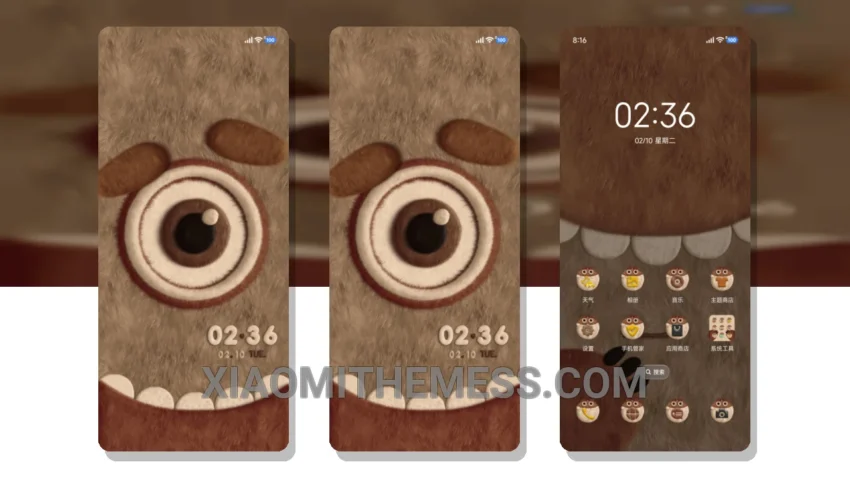
Dark mode just got a whole lot cuter with the Fluffy Monster Merade theme. This stunning theme is perfect for those who love the elegance of dark interfaces and contrast. I love how it provides a premium UI experience without sacrificing performance.
The Fluffy Monster Merade theme is fully compatible with HyperOS, MIUI 12, MIUI 13, and MIUI 14, making it a great choice for Xiaomi users. The theme’s dark mode optimization ensures that it looks great on AMOLED screens, providing an immersive experience.
Features and Compatibility
The Fluffy Monster Merade theme is designed to work seamlessly with Xiaomi devices, providing a range of features that enhance the user experience. From custom boot animation to AOD custom themes, this theme has it all. The theme is also compatible with icon pack integration, volume panel customizer, and dynamic island integration, making it a great choice for those who want a highly customizable theme.
One of the best things about this theme is its ability to provide a lag-free experience, thanks to its lightweight design. However, some users may find the theme’s design to be a bit too cute or childish. Nevertheless, the theme’s clean interface and aesthetic home screen make it a great choice for those who want a unique and premium look.
In my testing, I found the theme to be extremely stable and responsive, with no signs of battery drain or lag. The theme’s dark mode optimization is also impressive, providing a stunning AMOLED pure black experience that is easy on the eyes. To be honest, I’m impressed with the theme’s overall design and performance, and I think it’s a great choice for anyone looking for a unique and premium Xiaomi theme.
Theme Information
🛠️ How to Install This MTZ Theme
- Download the MTZ file to your device.
- Open the official Themes app and go to your profile.
- Import & Apply the downloaded file.