
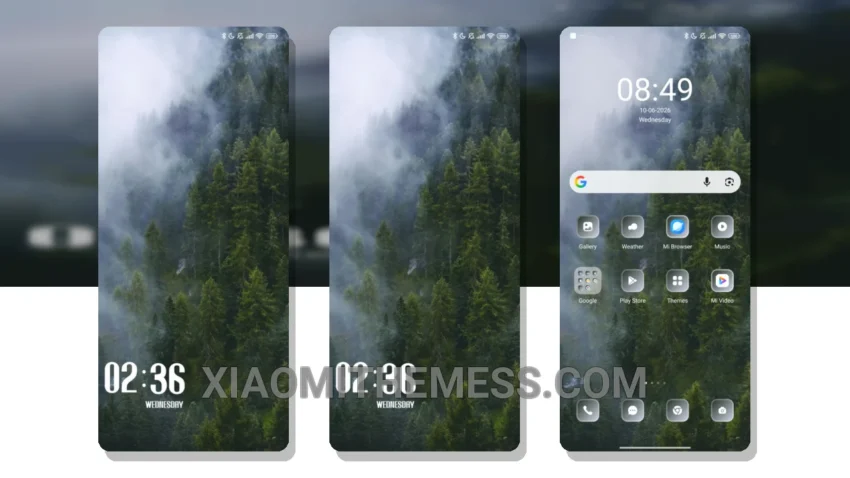
I’m obsessed with deep, rich themes that completely transform my device’s look and feel. The Foggy MTZ theme is one such theme that has caught my attention. It’s a great xiaomi theme that changes the control center, status bar, and icons, giving your device a fresh new look.
What really stands out is the theme’s clean interface and premium UI. The Foggy MTZ theme is fully compatible with HyperOS, MIUI 12, MIUI 13, and MIUI 14, making it a great option for Xiaomi and Redmi device users.
The theme’s aesthetic home screen and custom control center are definite highlights. The redesigned status bar and advanced widgets also add to the theme’s charm. However, some users may find the theme’s icon pack integration to be a bit limited.
Performance and Compatibility
Overall, the Foggy MTZ theme is a great option for those looking to customize their Xiaomi or Redmi device. With its lightweight design and no battery drain, it’s a theme that you can use without worrying about performance issues.
In my testing, I found the Foggy MTZ theme to be a great choice for anyone looking to give their device a fresh new look. The theme’s compatibility with HyperOS and various MIUI versions makes it a versatile option. To be honest, I’m really impressed with the Foggy MTZ theme and would definitely recommend it to anyone looking to customize their device.
Theme Information
🛠️ How to Install This MTZ Theme
- Download the MTZ file to your device.
- Open the official Themes app and go to your profile.
- Import & Apply the downloaded file.