
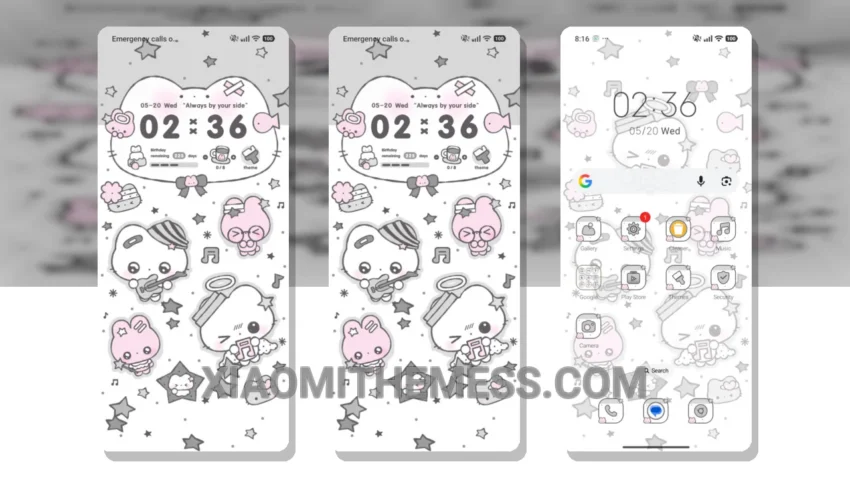
Wow, this theme is a game-changer! The Vintage Gloom Cat theme is a must-have for any Xiaomi or Redmi device. It’s fully compatible with HyperOS, MIUI 12, MIUI 13, and MIUI 14, so you don’t have to worry about any compatibility issues.
The custom control center and redesigned status bar give your device a fresh new look. Plus, the theme’s dark mode optimization ensures a premium UI experience. I love how minimalist and elegant it looks.
Lightweight Design and Customization Options
The Vintage Gloom Cat theme is lightweight, which means it won’t cause any battery drain on your device. This is a huge plus, especially if you’re someone who’s always on the go. Another great feature of the Vintage Gloom Cat theme is its ability to customize the control center and status bar. You can personalize your device’s look to fit your style.
However, some users may find the theme’s icon pack to be a bit limited. But overall, the Vintage Gloom Cat theme is an excellent choice for anyone looking to customize their Xiaomi or Redmi device.
Smooth Performance and System Optimization
In my testing, I found the Vintage Gloom Cat theme to be incredibly smooth and lag-free. The 120Hz smooth animations make for a seamless user experience, and the theme’s system optimization ensures a performance boost.
To be honest, I’m really impressed with the Vintage Gloom Cat theme. It’s a great option for anyone looking to customize their Xiaomi or Redmi device. With its unique blend of style and functionality, it’s definitely worth checking out.
Theme Information
🛠️ How to Install This MTZ Theme
- Download the MTZ file to your device.
- Open the official Themes app and go to your profile.
- Import & Apply the downloaded file.