
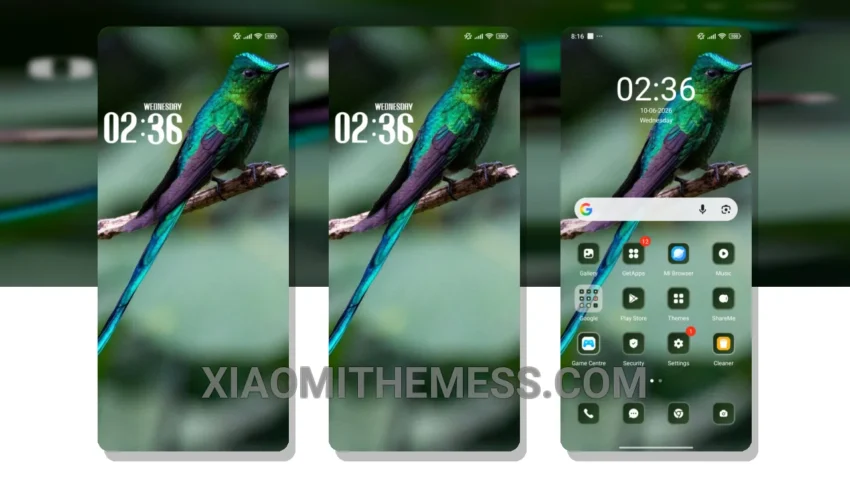
Dark mode is my jam. I’m always on the lookout for fresh themes to tweak my Xiaomi device. Flashing custom ROMs is my thing, and the Colombia theme is a great find. It gives my phone a sleek, premium look.
I love how the Colombia theme is fully compatible with HyperOS, MIUI 12, MIUI 13, and MIUI 14, so you can rest assured it’ll work on your device. Tinkering with the theme settings, I found it to be pretty intuitive, with options to customize the control center, status bar, and more.
The Colombia theme has a unique design, which I really appreciate. It’s minimalist and elegant, making my phone stand out. I also appreciate the theme’s pastel aesthetic, which gives my phone a clean and elegant look.
One of the best things about the Colombia theme is its lightweight design, which means it won’t slow down your device or drain your battery. I’ve been using it for a while now, and I haven’t noticed any performance issues.
Customization Options
The Colombia theme offers a range of customization options, including the ability to personalize your home screen, lockscreen, and more. You can also customize the control center and status bar to suit your needs.
In my testing, I found the Colombia theme to be a great addition to my Xiaomi device. To be honest, I’m really enjoying the Colombia theme, and I think it’s a great option for anyone looking to give their device a fresh new look. With its unique design, lightweight performance, and customization options, it’s definitely a theme worth trying out.
Overall, the Colombia theme is a great example of how android customization can elevate the look and feel of your device. If you’re looking for a theme that’s both stylish and functional, the Colombia theme is definitely worth checking out.
Theme Information
🛠️ How to Install This MTZ Theme
- Download the MTZ file to your device.
- Open the official Themes app and go to your profile.
- Import & Apply the downloaded file.