
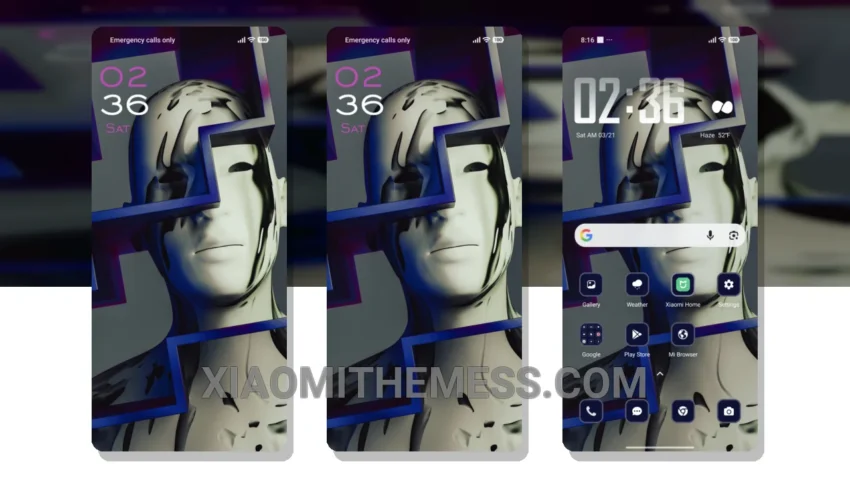
I love how clean and simple the Concept Art theme looks on my Xiaomi device. It’s all about pastel colors and minimal design, which gives my home screen a very aesthetic feel.
The theme is fully compatible with HyperOS, MIUI 12, MIUI 13, and MIUI 14, so you don’t have to worry about any compatibility issues. What really stands out is how well the theme is optimized for battery life, with features like dark mode optimization and a lightweight design.
Performance and Features
One of the things I appreciate about this theme is how smoothly it runs. The animations are 120Hz smooth, and the overall performance is lag-free, making it a joy to use. Of course, like any theme, it’s not perfect – I wish there were more customization options for the lock screen.
Despite that, I’m really enjoying the clean interface and premium feel of the theme. The redesigned status bar and custom control center are nice touches, and the icon pack integration is seamless.
In my testing, I found the theme to be very stable and easy to use. To be honest, I’m impressed by how well the designers have balanced form and function. If you’re looking for a theme that’s both beautiful and functional, Concept Art is definitely worth checking out.
The minimal pastel aesthetic design of the theme is really eye-catching, and the fact that it’s compatible with a range of Xiaomi devices makes it a great option for many users. With its clean interface and premium feel, this theme is sure to please even the most discerning users.
I’m really enjoying the Concept Art theme, and I think you will too. The combination of a clean design, smooth performance, and great features makes it a great choice for anyone looking to customize their Xiaomi device.
Theme Information
🛠️ How to Install This MTZ Theme
- Download the MTZ file to your device.
- Open the official Themes app and go to your profile.
- Import & Apply the downloaded file.