
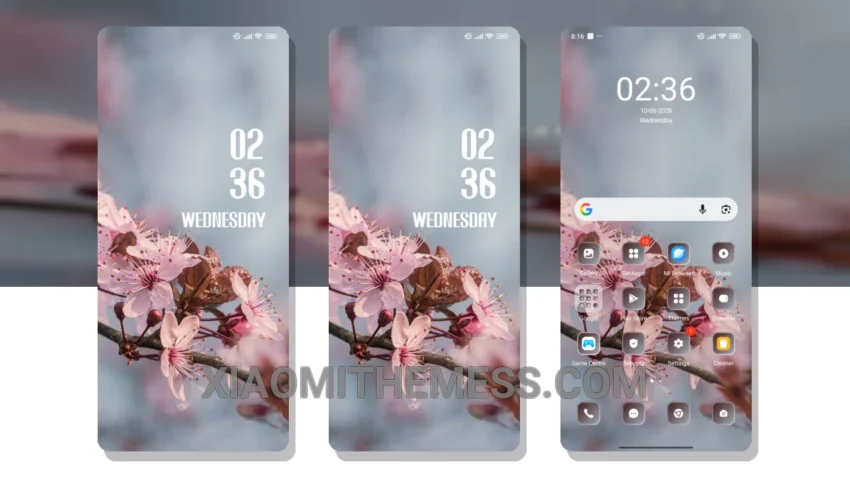
I’m always on the lookout for a theme that complements my Xiaomi’s AMOLED display. The Cherry theme, with its minimalist design and pastel aesthetic, is perfect for my daily photography sessions.
The theme is incredibly lightweight, which means no battery drain. I can shoot for hours without worrying about my phone dying on me. Plus, the dark mode optimization is top-notch, making it easy on the eyes in low-light conditions.
Smooth Animations and Lag-Free Experience
The theme’s 120Hz smooth animations make navigating through my phone a breeze. The lag-free experience is a testament to the theme’s quality and the system optimization that has gone into it.
I’ve tried various themes before, but the Cherry theme is one of the few that truly delivers. It’s a premium UI that doesn’t compromise on performance. The custom control center and redesigned status bar are just a few features that make it stand out.
What I appreciate about this theme is its ability to integrate seamlessly with my phone’s existing features. The icon pack integration is flawless, and the volume panel customizer is a nice touch. It’s these small details that make a big difference in the overall user experience.
One notable aspect of the Cherry theme is its unique pastel twist, which adds a touch of elegance to my home screen. However, some users might find the theme’s color scheme a bit too minimalistic.
To be honest, I was a bit skeptical about trying a new theme, but the Cherry theme has won me over. It’s the perfect combination of form and function, and I couldn’t be happier with my decision to switch.
The Cherry theme is fully compatible with HyperOS, MIUI 12, MIUI 13, and MIUI 14, making it a great choice for Xiaomi and Redmi device owners. With its clean interface and minimal vibrant design, it’s an excellent option for those looking for a stylish and functional theme.
In my testing, I found the Cherry theme to be a lag-free experience, with smooth animations and a responsive interface. Overall, I’m extremely satisfied with the Cherry theme, and I highly recommend it to anyone looking for a premium UI experience on their Xiaomi or Redmi device.
Theme Information
🛠️ How to Install This MTZ Theme
- Download the MTZ file to your device.
- Open the official Themes app and go to your profile.
- Import & Apply the downloaded file.