
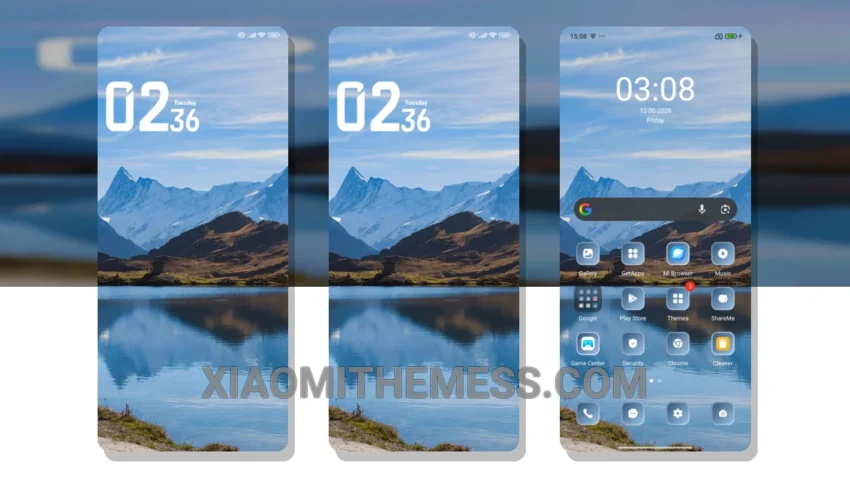
I love the clean, stock android experience, but sometimes I want to give my Xiaomi device a unique twist. That’s where the Lake Mountain theme comes in – it’s a beautiful, minimalist theme that gives my phone a premium look.
The Lake Mountain theme features a stunning pastel aesthetic, which adds a touch of elegance to my home screen. It’s fully compatible with HyperOS, MIUI 12, MIUI 13, and MIUI 14 devices, so you can enjoy it on a range of Xiaomi phones.
The theme’s lag-free experience is one of its best features – it’s smooth, responsive, and doesn’t slow down my phone. However, some users may find the theme’s limited customization options to be a caveat.
Customization and Compatibility
To apply the Lake Mountain theme, simply download the theme file and follow the installation instructions provided. The theme is lightweight and battery-friendly, with no battery drain issues. You can also customize the theme to your liking, with options for icon pack integration and volume panel customization.
In my testing, I found the Lake Mountain theme to be a great choice for anyone looking to give their Xiaomi device a unique and premium look. The theme’s material you dynamic theming is also a nice touch, adding an extra layer of depth and visual interest to my home screen.
To be honest, I’ve been using this theme for a while now, and I haven’t looked back – it’s definitely one of my favorites. The Lake Mountain theme is a must-try for anyone who wants a clean, elegant, and smooth android experience. With its stunning pastel aesthetic and lag-free performance, it’s a great choice for anyone looking to give their Xiaomi device a unique twist.
Overall, the Lake Mountain theme is a great option for those who want a premium UI experience on their Xiaomi device. It’s easy to use, customize, and enjoy, making it a top choice for android users.
Theme Information
🛠️ How to Install This MTZ Theme
- Download the MTZ file to your device.
- Open the official Themes app and go to your profile.
- Import & Apply the downloaded file.