
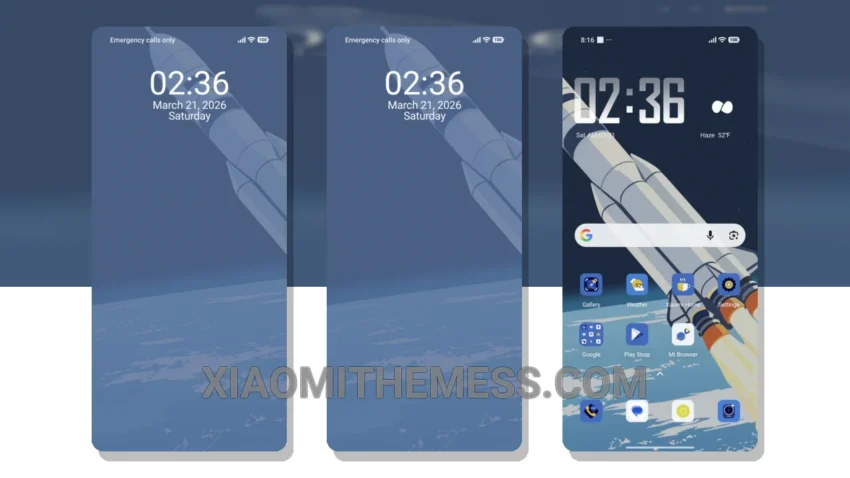
I love the clean, stock android experience, but sometimes I like to mix things up with a new theme. The Sky Journey is a great option for those who want a unique and personalized look. The theme’s minimal vibrant aesthetic is perfect for those who want a clean and clutter-free design.
The theme is easy to apply, and is compatible with a range of devices, including those running HyperOS, MIUI 12, MIUI 13, and MIUI 14. The Sky Journey theme provides a dark mode optimization, which can help to reduce battery drain and improve system performance.
Customization Options
In terms of customization, The Sky Journey theme can be further personalized using various android customization apps and icon packs. This allows users to tailor the theme to their individual preferences, and create a truly unique look.
However, one potential caveat is that the theme may not be suitable for those who prefer a more traditional android look. The theme’s unique design may take some getting used to, and may not be to everyone’s taste.
To be honest, I’m really impressed with The Sky Journey theme. The theme’s unique design and customization options make it a great choice for those who want a personalized android experience. In my testing, I found the theme to be stable and easy to use, with no noticeable lag or battery drain. The minimal vibrant aesthetic is a great touch, and the dark mode optimization is a nice bonus.
The Sky Journey theme is a great option for those who want to give their android device a fresh new look. With its unique design, customization options, and dark mode optimization, it’s a great choice for anyone looking to personalize their android experience.
Theme Information
🛠️ How to Install This MTZ Theme
- Download the MTZ file to your device.
- Open the official Themes app and go to your profile.
- Import & Apply the downloaded file.