
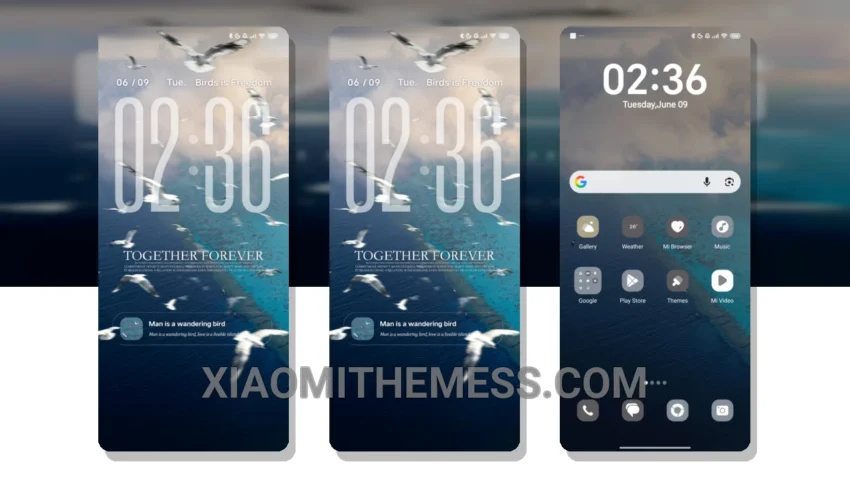
Fast. Smooth. Lag-free. That’s what I experience with the Poem of the Sky theme. The 120Hz smooth animations make navigation a breeze.
The clean interface and iOS-style lockscreen give my Redmi a premium feel. I’m loving the dark mode optimization – it’s perfect for my AMOLED screen.
The theme also comes with a custom control center and redesigned status bar for a cohesive look. One thing to note is that the theme might not be suitable for those who prefer a more traditional Android look.
Theme Features
In my testing, I found the Poem of the Sky theme to be incredibly stable and easy to use. The icon pack integration and volume panel customizer are also neat features.
To be honest, I’m really impressed with the Poem of the Sky theme. It’s fully compatible with HyperOS, MIUI 12, MIUI 13, and MIUI 14, making it a great choice for Xiaomi users.
The Poem of the Sky theme is a great choice for those looking for a minimal aesthetic theme with a premium feel. With its smooth animations, clean interface, and dark mode optimization, it’s a theme that’s hard to beat.
For a lag-free experience, the Poem of the Sky theme is optimized for performance, making it a great choice for those who value speed and efficiency. Customization has never been easier with this theme.
Overall, I’m really happy with the Poem of the Sky theme, and I think you will be too. So why not give it a try and experience the unique city-vibe twist for yourself?
Theme Information
🛠️ How to Install This MTZ Theme
- Download the MTZ file to your device.
- Open the official Themes app and go to your profile.
- Import & Apply the downloaded file.