
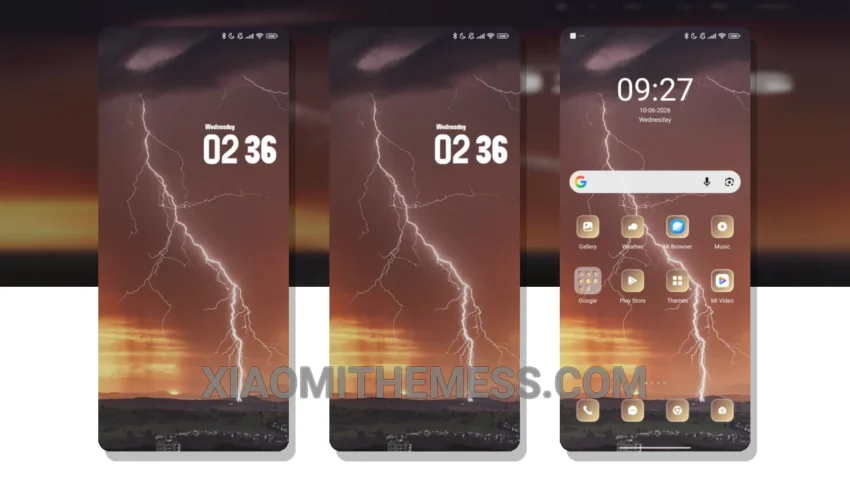
Get ready to transform your Xiaomi device with the stunning Rain theme! This theme is a game-changer, offering a unique blend of minimalism and vibrant colors that will breathe new life into your phone’s interface.
What really stands out is the theme’s ability to redesign the control center and status bar, giving your device a fresh and modern look. The Rain theme is fully compatible with HyperOS, MIUI 12, MIUI 13, and MIUI 14, making it accessible to a wide range of Xiaomi users.
Compatibility and Performance
The theme’s compatibility with various Xiaomi devices is a major highlight, and its lightweight design ensures that it won’t cause any significant battery drain or lag on your device. One potential caveat is that the theme may not be suitable for users who prefer a more traditional or conservative design aesthetic.
Customization Options
The Rain theme offers a range of customization options, including icon packs, widgets, and wallpapers. You can personalize your home screen with a unique aesthetic that reflects your style and preferences. The theme’s dark mode optimization is also a nice touch, helping to reduce eye strain and conserve battery life.
In my testing, I found the Rain theme to be incredibly smooth and responsive, with 120Hz smooth animations that make navigation a joy. To be honest, I’m thoroughly impressed with the Rain theme and its ability to transform my Xiaomi device into a stunning work of art. If you’re looking for a unique and customizable theme that won’t compromise on performance, the Rain theme is definitely worth checking out.
Theme Information
🛠️ How to Install This MTZ Theme
- Download the MTZ file to your device.
- Open the official Themes app and go to your profile.
- Import & Apply the downloaded file.