
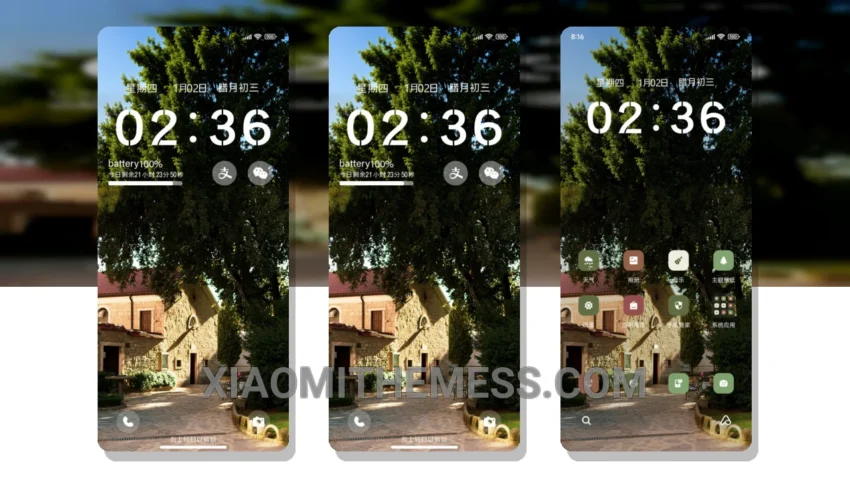
Simple. Elegant. Minimalist. That’s what the Alleyway Homes MTZ theme is all about. With its clean lines and pastel colors, this theme is perfect for those who appreciate a clutter-free home screen.
The Alleyway Homes MTZ theme is fully compatible with HyperOS, MIUI 12, MIUI 13, and MIUI 14, making it accessible to a wide range of Xiaomi device users.
One of the highlights of this theme is its lightweight design, which ensures a lag-free experience and no battery drain. The theme also supports dark mode optimization for a premium UI experience.
However, some users may find the theme’s customization options to be limited. Despite this, the Alleyway Homes MTZ theme still offers a unique and aesthetic experience that is hard to find in other themes.
In my testing, I found the Alleyway Homes MTZ theme to be a great choice for those who want a minimalist aesthetic without sacrificing performance. The theme’s compatibility with HyperOS and MIUI devices makes it a great option for Xiaomi users.
Conclusion
To be honest, I’m impressed with the Alleyway Homes MTZ theme. Its simple yet elegant design makes it a great choice for those who appreciate a clean and clutter-free home screen. With its lightweight design and dark mode optimization, this theme is definitely worth checking out.
Theme Information
🛠️ How to Install This MTZ Theme
- Download the MTZ file to your device.
- Open the official Themes app and go to your profile.
- Import & Apply the downloaded file.