
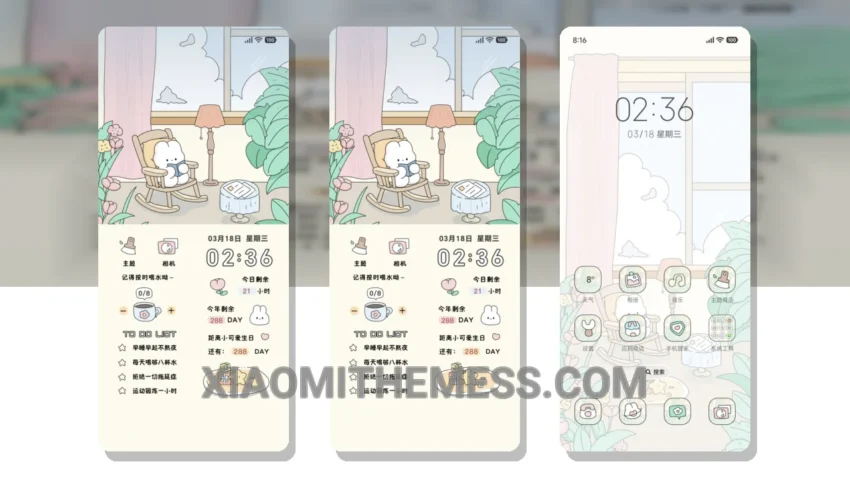
Get ready to transform your Xiaomi phone with the stunning Cozy Home Diary theme! This beautiful theme is designed to give your phone a fresh new look, with a pastel aesthetic and minimal design that’s sure to impress.
The Cozy Home Diary theme is fully compatible with HyperOS, MIUI 12, MIUI 13, and MIUI 14, making it easy to install and apply on your Xiaomi phone. With its lightweight design, you don’t have to worry about battery drain or performance issues.
Customization Options
The theme’s pastel colors and simple design make it easy to navigate and use your phone, and the dark mode optimization provides a great viewing experience even in low light conditions. You can also integrate your own icon packs, customize the boot animation, and even create your own AOD custom themes.
One of the best things about the Cozy Home Diary theme is its clean and minimal interface. The theme’s design is easy to use and provides a great user experience. Additionally, the theme’s customization options allow you to personalize your phone and make it truly unique.
However, one thing to note is that the theme’s minimal design may not be suitable for everyone, as some users may find it too simple. But overall, the Cozy Home Diary theme is a great choice for anyone looking to give their Xiaomi phone a fresh new look.
To be honest, I’m really impressed with this theme, and I think you will be too! The Cozy Home Diary theme is a great example of how a well-designed theme can enhance the overall user experience of a Xiaomi phone.
Theme Information
🛠️ How to Install This MTZ Theme
- Download the MTZ file to your device.
- Open the official Themes app and go to your profile.
- Import & Apply the downloaded file.