
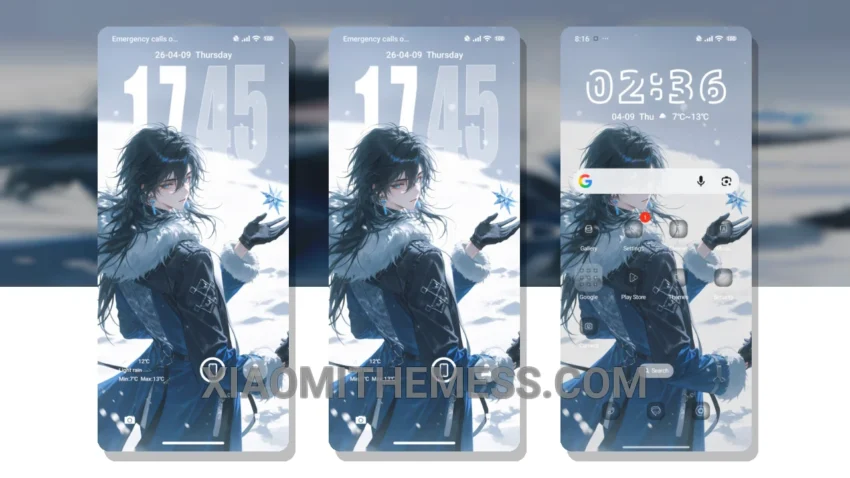
Winter has arrived, and with it, the Prince of Snow theme. This stunning HyperOS theme completely transforms the look of your Xiaomi phone with its unique winter wonderland design, perfect for those seeking a customized and elegant look.
The Prince of Snow theme is fully compatible with HyperOS, MIUI 12, MIUI 13, and MIUI 14, ensuring a seamless user experience without compatibility issues. The theme is also highly customizable, allowing you to personalize icons, control center, and status bar according to your preferences.
One of the notable features of this theme is its support for dark mode optimization, ideal for saving battery life and reducing eye strain. Additionally, the theme is very lightweight, requiring only 9.14 MB of storage space, making it an excellent option for those seeking a slim and efficient theme.
However, some users may find the theme’s features and customization options overwhelming, particularly those who prefer a more minimalistic look. In my experience, the Prince of Snow theme has proven to be very stable and smooth, without any crashes or slowdowns, even with all the features and customization options enabled.
Key Features and details
With its clean interface, minimal vibrant design, and advanced widgets, the Prince of Snow theme provides a premium UI experience. The theme’s custom control center and redesigned status bar further enhance its aesthetic appeal. Overall, the Prince of Snow theme is a great choice for those looking to customize their Xiaomi phone with a unique and elegant theme.
To be honest, I’m impressed with this theme and believe it’s a great option for those seeking a customized look for their Xiaomi phone. The Prince of Snow theme offers a range of features that make it stand out from other themes, including its unique design, customization options, and support for dark mode optimization, making it an excellent choice for Xiaomi phone users.
Theme Information
🛠️ How to Install This MTZ Theme
- Download the MTZ file to your device.
- Open the official Themes app and go to your profile.
- Import & Apply the downloaded file.