
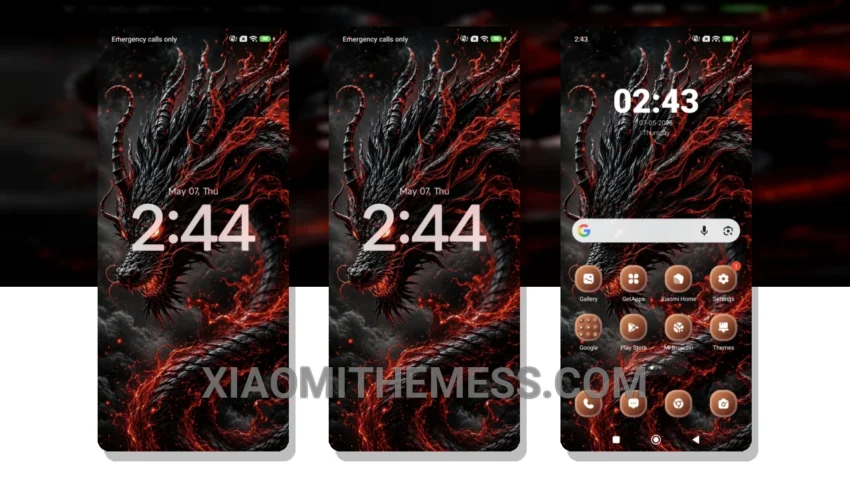
I’m obsessed with dark modes. They’re not just easy on the eyes, but also help save battery life. That’s why I’m excited about the Crimson Wrath theme. This theme is all about dark mode optimization, making it perfect for AMOLED screens.
With the Crimson Wrath theme, you get a sleek and elegant interface that’s designed to provide a lag-free experience. The theme is fully compatible with HyperOS, MIUI 12, MIUI 13, and MIUI 14, so you can enjoy it on your Xiaomi or Redmi phone.
Customization Options
The Crimson Wrath theme offers several customization options. For one, it’s highly customizable, with options to customize the icon pack, volume panel, and more. Additionally, the theme supports dynamic island integration and custom boot animation, making it a great choice for those who want a unique and personalized interface.
The theme also supports 120Hz smooth animations for a seamless user experience. However, one thing to note is that the theme may have a slight learning curve due to its numerous customization options.
To be honest, I’m impressed with the Crimson Wrath theme. It’s a great choice for anyone looking for a sleek and elegant dark mode interface on their Xiaomi or Redmi phone. With its lightweight design, smooth animations, and customizable options, this theme is definitely worth checking out.
Theme Information
🛠️ How to Install This MTZ Theme
- Download the MTZ file to your device.
- Open the official Themes app and go to your profile.
- Import & Apply the downloaded file.