
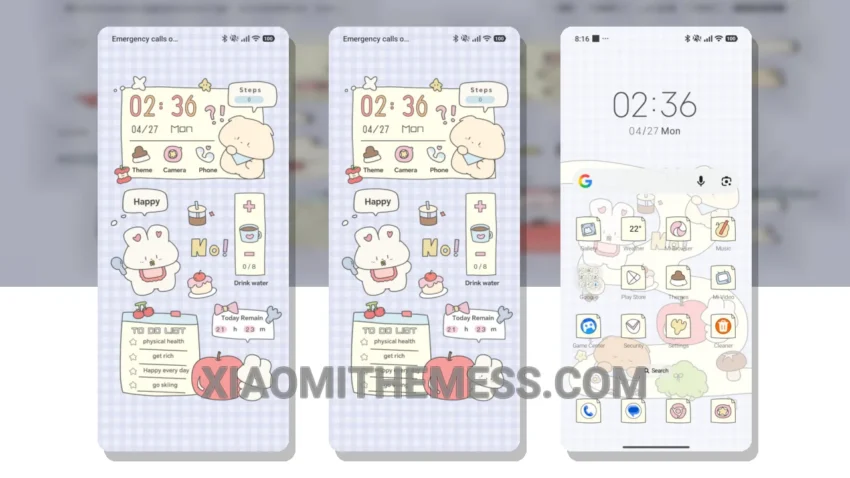
Get ready to give your Xiaomi a fresh new look with the Cute Slim Path MTZ theme! This theme is fully compatible with HyperOS, MIUI 12, MIUI 13, and MIUI 14, so you can enjoy it regardless of your device’s operating system.
What really stands out is the theme’s ability to completely transform your device’s interface, from the control center to the status bar and icons. The result is a clean and sleek design that’s sure to turn heads.
The Cute Slim Path MTZ theme is not just about looks, though – it’s also designed to be lightweight and efficient, so you don’t have to worry about it slowing down your device or draining your battery.
Features and Customization
One of the best things about this theme is its customizability. You can personalize your home screen, lock screen, and even the always-on display to fit your unique style. Plus, the theme supports icon pack integration, so you can choose from a wide range of icons to match your aesthetic.
In my testing, I was impressed by how seamlessly the theme integrated with my device’s existing features. The 120Hz smooth animations made for a lag-free experience, and the dark mode optimization helped save battery life.
To be honest, I was a bit skeptical about trying a new theme, but the Cute Slim Path MTZ theme has won me over. It’s the perfect combination of form and function, and I love how it’s given my device a fresh new look.
Theme Information
🛠️ How to Install This MTZ Theme
- Download the MTZ file to your device.
- Open the official Themes app and go to your profile.
- Import & Apply the downloaded file.