
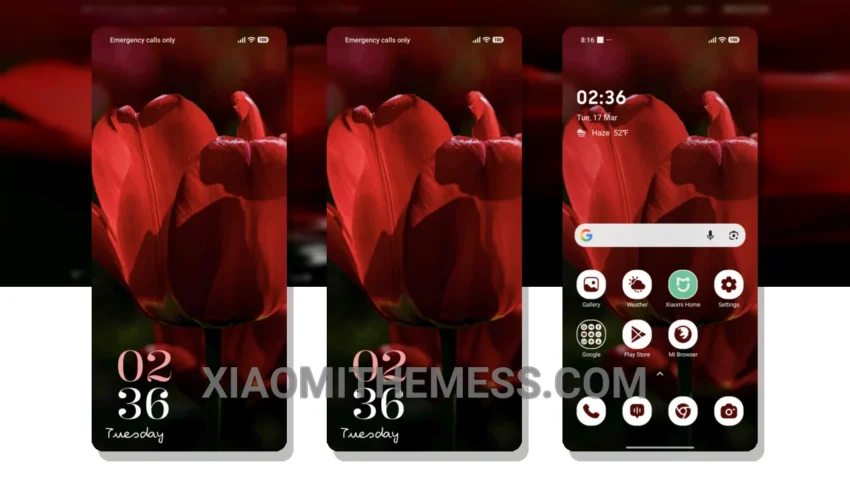
Simple. Elegant. The Dark Tulip theme is a masterpiece of minimalism. It’s all about clean lines, pastel colors, and an uncluttered home screen.
Get ready to experience smooth animations on your Xiaomi device with the Dark Tulip theme. This theme is designed to provide a lag-free experience, making it perfect for those who want a seamless user interface.
The Dark Tulip theme is fully compatible with HyperOS, MIUI 12, MIUI 13, and MIUI 14, ensuring that you can enjoy its features without any compatibility issues. Plus, it’s designed with dark mode optimization, which helps reduce battery consumption and provides a lag-free experience.
Customization Options
The Dark Tulip theme allows for icon pack integration and custom boot animation, giving you the freedom to personalize your device to your liking. You can also enjoy 120Hz smooth animations and system optimization for a performance boost.
One thing to note is that the theme may not be suitable for those who prefer a bright and vibrant look, as it has a more muted tone. However, for those who appreciate a clean and minimalistic design, the Dark Tulip theme is a great choice.
To be honest, I was impressed with the theme’s ability to provide a seamless user experience, and I think it’s a great option for those who want a clean and elegant look on their Xiaomi device.
Theme Information
🛠️ How to Install This MTZ Theme
- Download the MTZ file to your device.
- Open the official Themes app and go to your profile.
- Import & Apply the downloaded file.