
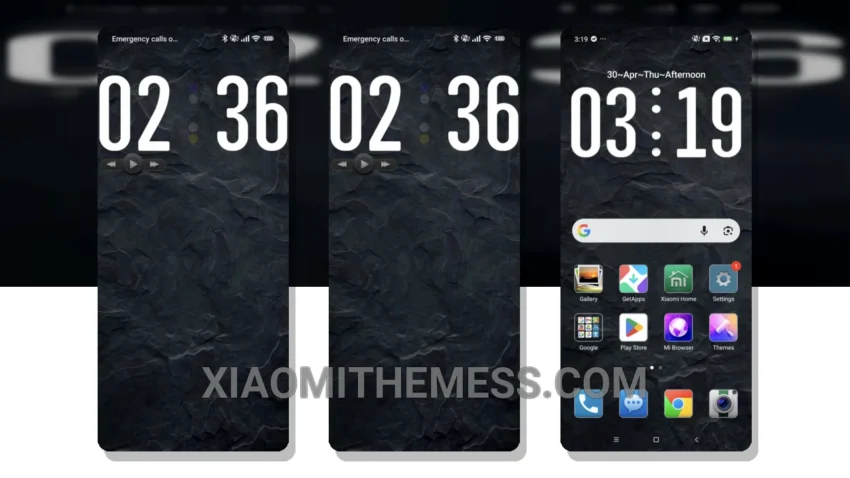
I’m always on the lookout for the next big thing in android customization. Recently, I stumbled upon the DarkStone theme, and I must say, it’s a game-changer. The theme’s ability to give your Xiaomi device a premium look without sacrificing performance is impressive.
Tinkering with the theme, I found that it’s compatible with HyperOS, MIUI 12, MIUI 13, and MIUI 14, making it a great option for those who want a unique look without worrying about compatibility issues. The theme’s custom control center and redesigned status bar are definitely highlights, offering a sleek and intuitive user experience.
Lightweight Design
The DarkStone theme has a lightweight design, which means no battery drain. I’ve been using it for a while now, and I can attest that it’s been a lag-free experience. The theme also offers dark mode optimization, which is a must-have for anyone who wants to conserve battery life.
However, one thing to note is that the theme may not be suitable for those who prefer a more minimalistic look, as it can be a bit overwhelming at times. But for those who want a premium UI with a touch of elegance, the DarkStone theme is definitely worth considering.
Customization Options
In my testing, I found that the theme’s icon pack integration and custom boot animation features are definitely worth exploring. The theme also offers a range of advanced widgets and interactive lockscreen widgets, making it a great option for those who want a more personalized user experience.
To be honest, I’m impressed with the DarkStone theme, and I think it’s a great option for anyone looking to give their Xiaomi device a fresh new look. With its unique design and range of customization options, it’s definitely a theme worth checking out.
Theme Information
🛠️ How to Install This MTZ Theme
- Download the MTZ file to your device.
- Open the official Themes app and go to your profile.
- Import & Apply the downloaded file.