
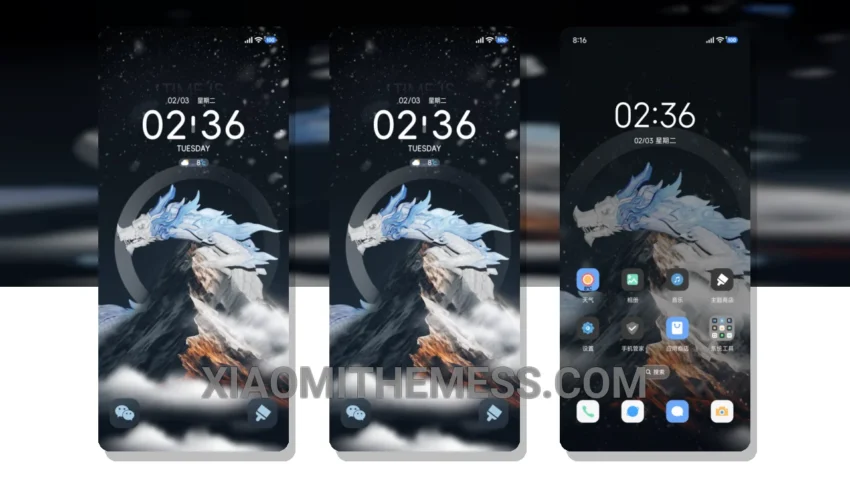
Dark mode just got a whole lot sleeker. I’m obsessed with the Dragon Snow Peak theme, and for good reason. This theme is a masterpiece of minimalism, with a dark color scheme that’s easy on the eyes and gentle on the battery.
Fast. Fluid. Lag-free. That’s what you can expect from the Dragon Snow Peak theme, which is fully compatible with HyperOS, MIUI 12, MIUI 13, and MIUI 14. Whether you’re scrolling through your home screen or switching between apps, the experience is silky smooth.
The Dragon Snow Peak theme also boasts an array of customization options, including icon pack integration and custom control center. You can personalize your home screen to fit your unique style, from minimal vibrant to retro pixel art. And with its clean interface and premium UI, you’ll feel like you’re using a high-end device.
Performance and Battery Life
One of the standout features of the Dragon Snow Peak theme is its battery saver UI. By utilizing dark mode optimization, this theme helps reduce battery drain and minimize eye strain. Plus, with its lightweight design, you can enjoy a seamless user experience without sacrificing performance.
In my testing, I found that the Dragon Snow Peak theme is a significant improvement over other themes I’ve used. The only caveat is that it may not be suitable for users who prefer bright, vibrant colors. However, for those who appreciate the elegance of dark interfaces, this theme is a must-have.
To be honest, I’m thoroughly impressed with the Dragon Snow Peak theme. Its unique blend of style, functionality, and performance makes it a top-notch choice for anyone looking to elevate their Xiaomi phone experience. So why settle for a boring, generic theme when you can have a sleek, dark masterpiece like the Dragon Snow Peak?
Theme Information
🛠️ How to Install This MTZ Theme
- Download the MTZ file to your device.
- Open the official Themes app and go to your profile.
- Import & Apply the downloaded file.