
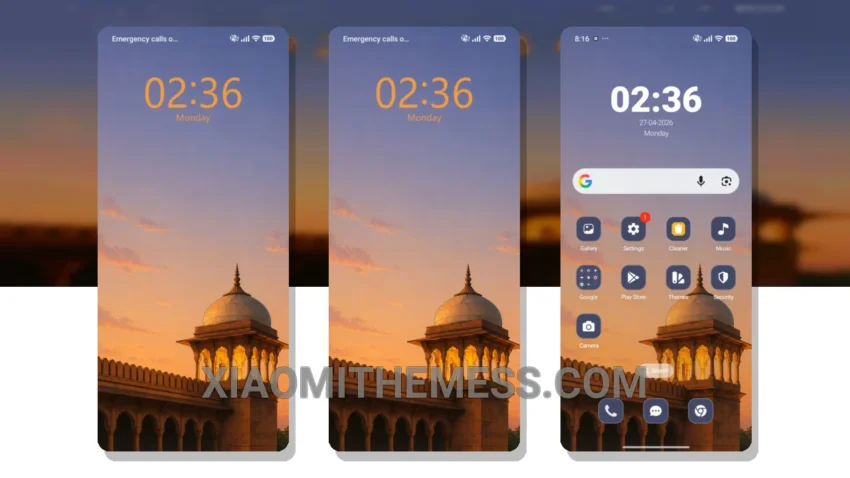
Soft colors, elegant design, and a premium feel – that’s what you get with Dusk Royalty, a HyperOS theme that redefines the concept of minimalism. This theme is all about simplicity, with a focus on clean lines and a pastel color palette that’s both soothing and visually appealing.
I’m impressed by the attention to detail in Dusk Royalty, from the custom boot animation to the redesigned status bar. The theme’s use of pastel colors and clean lines creates a visually appealing and soothing experience.
Compatibility and Performance
Dusk Royalty is fully compatible with HyperOS, MIUI 12, MIUI 13, and MIUI 14, making it accessible to a wide range of Xiaomi and Redmi devices. Whether you’re looking to give your device a fresh new look or simply want to experience the luxury of a premium theme, Dusk Royalty is definitely worth checking out.
In terms of performance, I’ve found that the theme is surprisingly lightweight, with no noticeable battery drain or lag. The dark mode optimization is also a nice touch, providing a battery-friendly experience that’s perfect for everyday use.
One thing to consider is that the theme’s customization options might be a bit limited for some users, but for those looking for a clean and elegant theme, Dusk Royalty is a great choice. The theme’s use of pastel colors and clean lines creates a visually appealing and soothing experience.
To be honest, I’m really impressed with the overall design and functionality of the theme, and I think it’s a great option for anyone looking to give their device a fresh new look. Dusk Royalty is a great example of a minimal vibrant theme, with a focus on simplicity and elegance.
Theme Information
🛠️ How to Install This MTZ Theme
- Download the MTZ file to your device.
- Open the official Themes app and go to your profile.
- Import & Apply the downloaded file.