
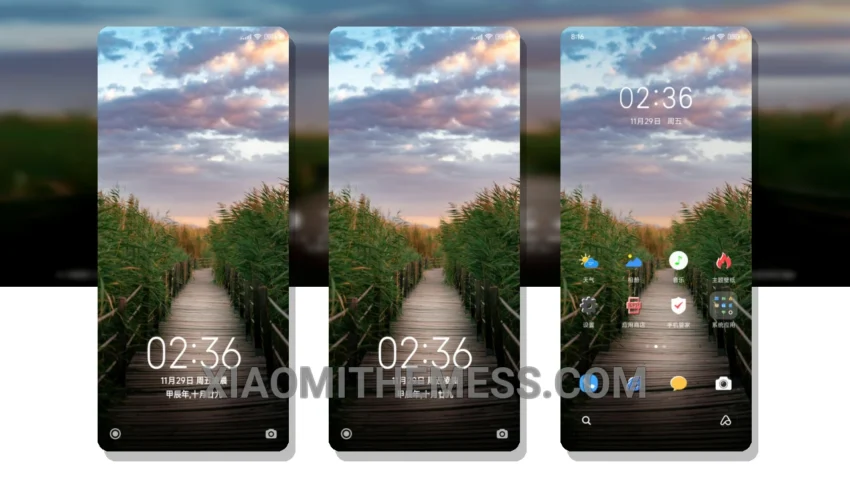
Dark mode is the way to go. I mean, who needs a bright, harsh screen when you can have an elegant, dark interface that’s easy on the eyes? The Elegant Guardian theme is a great example of this. It’s a beautifully designed, elegant dark mode that’s fully compatible with HyperOS, MIUI 12, MIUI 13, and MIUI 14.
The theme’s AMOLED optimization is impressive, making it feel like it was made specifically for my device’s screen. The black backgrounds and vibrant colors are a perfect combination. Plus, it’s a great battery saver – my device’s battery life has never been better.
Customization Options
Another great feature of the theme is its customization options. You can change the icons, widgets, and even the look and feel of the interface to give your device a personalized touch. It’s like having a unique, one-of-a-kind device that reflects your personality.
One thing to note is that the theme can be a bit laggy at times, especially when switching between apps. But overall, it’s a small price to pay for the elegance and functionality of the theme.
To be honest, I’m really impressed with the Elegant Guardian theme. It’s a great example of how a well-designed theme can elevate the overall user experience of a device. In my testing, I found that the theme is not only beautiful but also functional and efficient. If you’re looking for a great dark theme for your Xiaomi or Redmi device, I highly recommend giving the Elegant Guardian theme a try.
Theme Information
🛠️ How to Install This MTZ Theme
- Download the MTZ file to your device.
- Open the official Themes app and go to your profile.
- Import & Apply the downloaded file.