
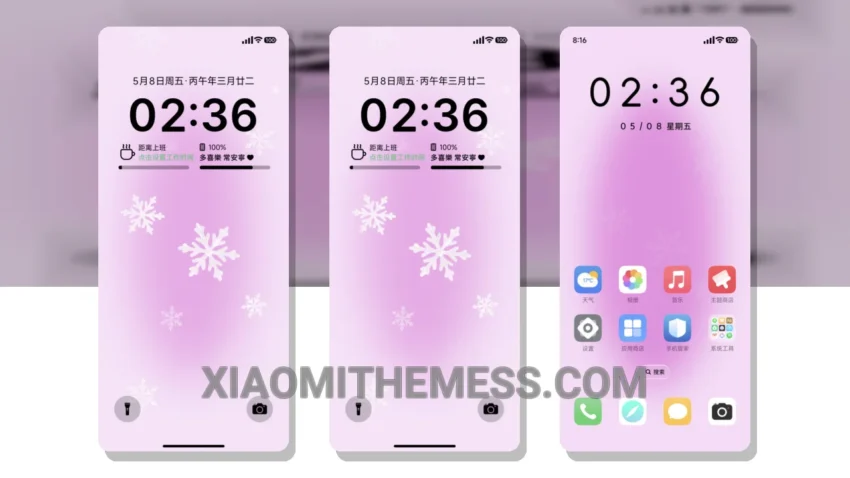
I love a clean aesthetic. The Qian Bai OS theme, which translates to ‘Elegant White’, gives my Xiaomi device a sleek, minimalist look that’s hard to resist. Elegant white and minimalist design make my device look premium and sophisticated.
The Qian Bai OS theme is fully compatible with HyperOS, MIUI 12, MIUI 13, and MIUI 14, so I can enjoy a seamless and lag-free experience. It’s also lightweight, with no battery drain issues, making it perfect for daily use.
Features and Customization
The Qian Bai OS theme comes with a range of features, including a custom control center and redesigned status bar, which give my device a unique and personalized look. I can customize my home screen with beautiful widgets and enjoy a lag-free experience with 120Hz smooth animations.
One of the standout aspects of this theme is its attention to detail. The designer has thought of everything, from the custom boot animation to the interactive lockscreen widgets. The theme also supports icon pack integration, allowing me to customize my icons to match my style.
For those who love a minimalist look, this theme is a must-have. With its clean interface and premium UI, I feel like I’m using a high-end device. To be honest, I’ve been using this theme for a while now, and I’m still impressed by its beauty and functionality. In my testing, I found that the theme works smoothly and efficiently, with no lag or glitches.
With its minimal vibrant design, the Elegant White theme is perfect for those who want a sleek and sophisticated look on their Xiaomi device. The theme’s custom control center and redesigned status bar give it a unique and personalized touch.
Theme Information
🛠️ How to Install This MTZ Theme
- Download the MTZ file to your device.
- Open the official Themes app and go to your profile.
- Import & Apply the downloaded file.