
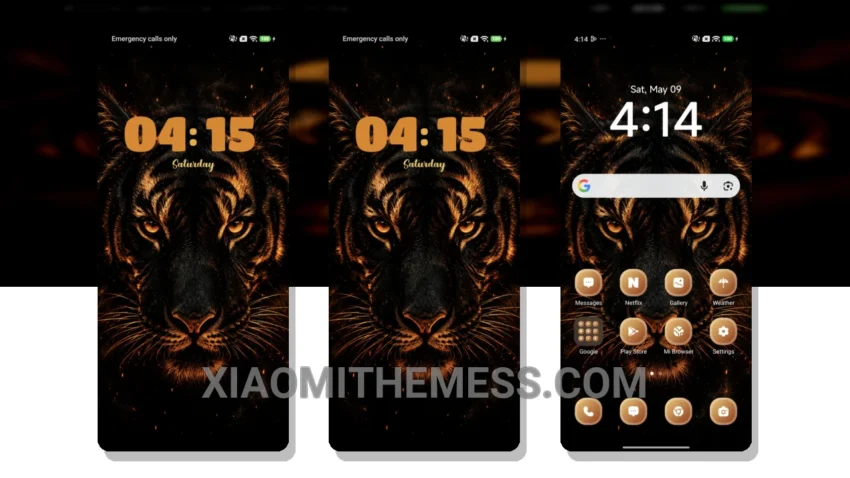
Dark mode is not just a trend, it’s a way of life. That’s why I’m excited about the Ember Roar theme, which brings a touch of elegance to Xiaomi devices. With its dark mode optimization, this theme is perfect for those who want to reduce eye strain and save battery life.
The Ember Roar theme is fully compatible with HyperOS, MIUI 12, MIUI 13, and MIUI 14, making it a great option for Xiaomi users. It provides a seamless user experience, with 120Hz smooth animations and a lag-free experience.
Features and Customization
The Ember Roar theme comes with a range of features, including customizable icons, wallpapers, and a redesigned status bar. Users can also customize the look and feel of their device using the theme’s built-in customization options.
One of the best things about this theme is its ability to provide a clean and minimal interface, which is perfect for those who want a clutter-free home screen. However, some users may find the theme’s customization options to be limited. Despite this, the Ember Roar theme is a great choice for those who want a dark mode theme that is both elegant and functional.
In my testing, I found the Ember Roar theme to be a great choice for those who want a dark mode theme that is both elegant and functional. The theme’s ability to provide a seamless user experience, combined with its customization options, make it a great option for Xiaomi users. With its dark mode optimization and clean interface, the Ember Roar theme is a must-have for anyone looking to elevate their Xiaomi device’s aesthetic and performance.
To get the most out of the Ember Roar theme, I recommend exploring its customization options and finding the perfect balance between style and functionality. Customize your control center, status bar, and icons to create a unique look that reflects your personality. Whether you’re a fan of minimalism or prefer a more vibrant aesthetic, the Ember Roar theme has something to offer.
Overall, the Ember Roar theme is a great choice for anyone looking to upgrade their Xiaomi device’s look and feel. Its dark mode optimization, customization options, and clean interface make it a must-have for anyone who wants a sleek and functional theme.
Theme Information
🛠️ How to Install This MTZ Theme
- Download the MTZ file to your device.
- Open the official Themes app and go to your profile.
- Import & Apply the downloaded file.