
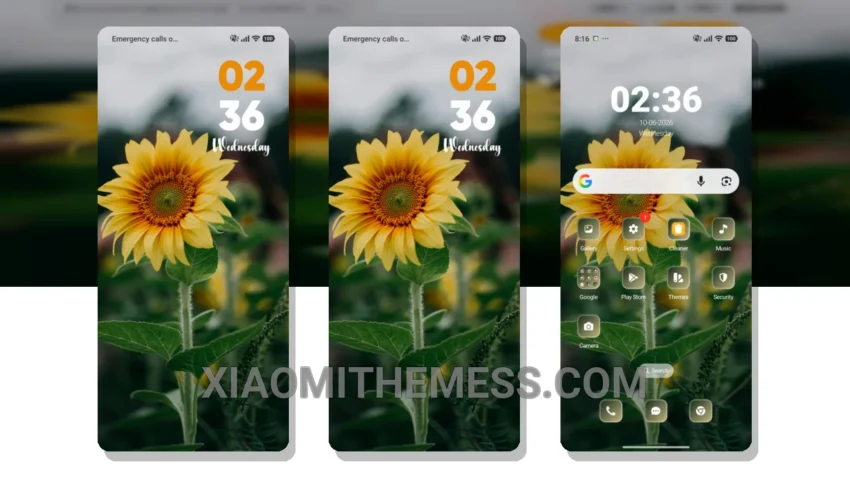
Follow The Sun is an amazing theme that completely transforms your device’s look. It’s got a beautiful pastel aesthetic that’s both soothing and vibrant. This theme is all about giving your device a fresh new look, from the control center to the status bar and icons.
So, what makes this theme so special? For starters, it’s fully compatible with HyperOS, MIUI 12, MIUI 13, and MIUI 14, so you don’t have to worry about it working on your device. The theme also supports dark mode optimization, which is great for saving battery life and reducing eye strain.
One of the best things about the Follow The Sun theme is how much it changes the default look of your device. The custom control center and redesigned status bar give your device a unique and premium feel. Plus, the theme is really easy to apply, and it’s a lightweight theme that won’t slow down your device or drain your battery.
Overall, the Follow The Sun theme is a great choice for anyone looking to give their device a fresh new look. It’s got a lot of great features, including custom boot animation and AOD custom themes. The only downside is that it can be a bit overwhelming at first, with so many options to customize. But once you get used to it, you’ll love how much you can personalize your device.
To be honest, I was really impressed with the Follow The Sun theme. The 120Hz smooth animations and lag-free experience make it a joy to use. In my testing, I found that the theme was really stable and didn’t cause any issues with my device. So, if you’re looking for a great new theme to try out, I’d definitely recommend giving Follow The Sun a shot.
Theme Information
🛠️ How to Install This MTZ Theme
- Download the MTZ file to your device.
- Open the official Themes app and go to your profile.
- Import & Apply the downloaded file.