
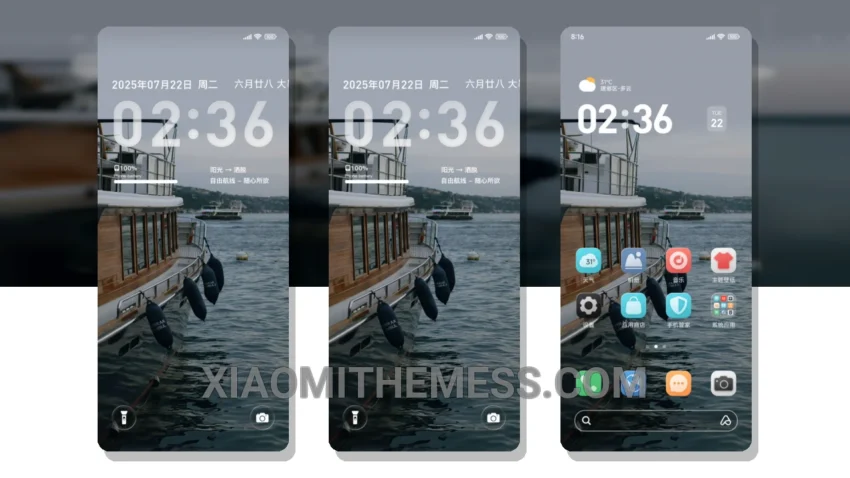
Freedom OS, a sleek and modern theme designed for Xiaomi and Redmi phones, is a game-changer. It’s fully compatible with HyperOS, MIUI 12, MIUI 13, and MIUI 14. I love how clean and minimal the interface looks. The theme is a great choice for those who want a lag-free experience and 120Hz smooth animations.
The theme is very easy to apply, and it’s available for download from the theme store. The size of the theme is 19.52 MB, which is relatively small compared to other themes. The author of the theme has done a great job in designing a theme that is both aesthetically pleasing and functional.
Key Features
The Freedom OS theme has a premium UI feel to it, with a custom control center and a redesigned status bar. The dark mode optimization is also on point. The theme has a clean interface, which makes it easy to navigate. I also love the fact that the theme has a custom boot animation and AOD custom themes.
In my testing, I found that the theme is very responsive and fast. The animations are smooth, and the interface is very easy to navigate. The theme also supports icon pack integration and volume panel customizer. Overall, I’m very impressed with the Freedom OS theme, and I would definitely recommend it to anyone looking to customize their Xiaomi or Redmi phone.
To be honest, I’m very happy with the Freedom OS theme. It’s a great choice for anyone who wants a clean and minimal interface, smooth animations, and a premium UI feel. The theme is also very easy to apply, and it’s available for download from the theme store. I would definitely recommend it to anyone looking to customize their Xiaomi or Redmi phone.
Theme Information
🛠️ How to Install This MTZ Theme
- Download the MTZ file to your device.
- Open the official Themes app and go to your profile.
- Import & Apply the downloaded file.