
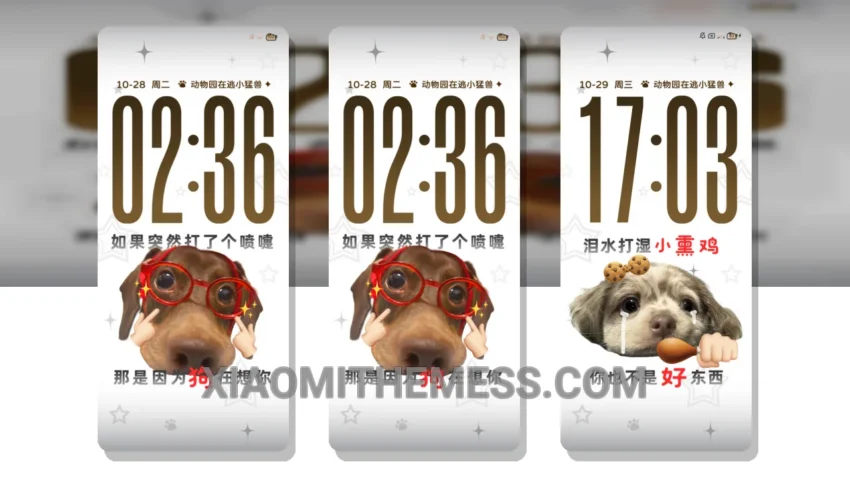
Dark mode is my jam. I mean, who needs a bright, glaring screen when you can have a sleek, minimalist interface that’s easy on the eyes? The Fun Sausage multi-change picture theme is a great example of a well-designed dark theme. Compatible with HyperOS, MIUI 12, 13, and 14, this theme is a must-have for any Xiaomi user.
One of the things that sets this theme apart is its unique twist on the traditional dark mode aesthetic. With a focus on clean lines and simple shapes, the Fun Sausage theme creates a visually striking experience that’s both modern and sophisticated.
I love how the theme’s dark background helps to reduce eye strain and conserve battery life. It’s perfect for those long gaming sessions or Netflix binges. And with its lag-free experience and 120Hz smooth animations, you’ll feel like you’re using a whole new device.
The Fun Sausage theme is also highly customizable, allowing you to personalize your home screen, lock screen, and even notification shade. You can choose from a variety of icon packs, wallpapers, and other customization options to create a look that’s all your own.
Of course, no theme is perfect, and the Fun Sausage theme is no exception. One thing that might be a caveat for some users is the lack of support for certain third-party apps. However, the theme’s developer is constantly updating and improving the theme, so this issue may be resolved in the future.
In my testing, I found the Fun Sausage theme to be a great choice for anyone looking for a sleek, modern dark theme for their Xiaomi device. With its unique design, customizable options, and battery-saving features, it’s a must-have for any dark mode fanatic like myself.
Theme Information
🛠️ How to Install This MTZ Theme
- Download the MTZ file to your device.
- Open the official Themes app and go to your profile.
- Import & Apply the downloaded file.