
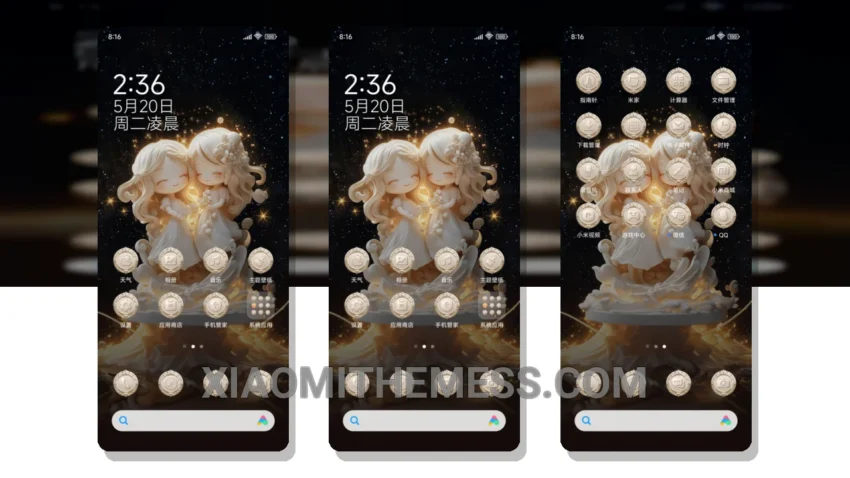
I’m obsessed with deep themes that completely transform my device, and the Gemini Love Theme is no exception. This theme is a game-changer, with its elegant pastel aesthetic that permeates every aspect of the UI. From the custom control center to the redesigned status bar, every detail has been meticulously crafted to create a seamless and visually stunning experience.
The Gemini Love Theme is fully compatible with HyperOS, MIUI 12, MIUI 13, and MIUI 14, so you can enjoy it regardless of your device’s operating system. One of the standout features of this theme is its ability to completely revamp the look and feel of your device, making it feel like a brand new phone.
Customization Options
In terms of customization, the Gemini Love Theme offers a wide range of options, including custom boot animation, AOD custom themes, and icon pack integration. You can also customize the volume panel and enjoy dynamic island integration, giving you a truly personalized experience.
The Gemini Love Theme’s lightweight design means it won’t slow down your device or cause battery drain. Additionally, the theme’s dark mode optimization and 120Hz smooth animations provide a lag-free experience that’s a joy to use.
However, one potential caveat is that the theme’s pastel aesthetic may not be to everyone’s taste, so it’s worth checking out the theme’s screenshots before downloading. Overall, though, the Gemini Love Theme is a must-have for anyone looking to give their device a fresh new look.
In my testing, I was blown away by the Gemini Love Theme’s attention to detail and its ability to transform my device into a work of art. To be honest, I’ve never been a fan of stock themes, but this one has won me over. If you’re looking for a theme that will take your device to the next level, look no further than the Gemini Love Theme.
Theme Information
🛠️ How to Install This MTZ Theme
- Download the MTZ file to your device.
- Open the official Themes app and go to your profile.
- Import & Apply the downloaded file.