
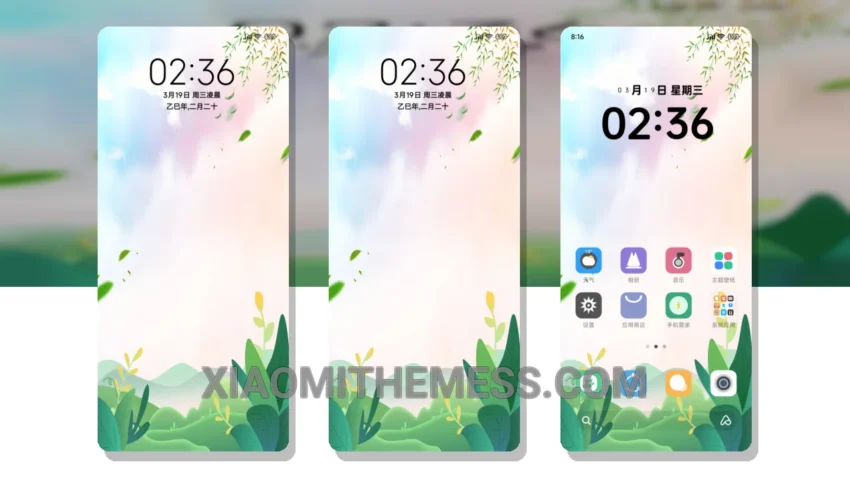
I’m always on the lookout for a reliable and elegant theme for my daily driver. That’s why I was excited to try out the Green Freshness theme. This theme is a great choice for anyone who wants a clean and minimal design.
The Green Freshness theme is fully compatible with HyperOS, MIUI 12, MIUI 13, and MIUI 14, making it a great option for Xiaomi and Redmi devices. One of the things I like about this theme is its pastel aesthetic, which gives my device a fresh and vibrant look.
In terms of performance, the Green Freshness theme is lightweight and doesn’t cause any battery drain. The theme also supports 120Hz smooth animations, making it a great choice for devices with high refresh rates.
Overall, I’m really happy with the Green Freshness theme. The only thing that might be a caveat for some users is that it doesn’t have a lot of customization options. However, I think the theme’s default design is so well-done that I don’t feel the need to customize it much.
To be honest, I’ve been using the Green Freshness theme for a while now, and I’m really impressed with its performance and design. The theme’s clean interface and aesthetic home screen make it a joy to use every day. If you’re looking for a great theme for your Xiaomi or Redmi device, I would definitely recommend checking out the Green Freshness theme.
Conclusion
In my testing, the Green Freshness theme has proven to be a great choice for anyone who wants a reliable and elegant theme for their daily driver. With its clean design, lightweight performance, and support for dark mode optimization, this theme is definitely worth checking out.
Theme Information
🛠️ How to Install This MTZ Theme
- Download the MTZ file to your device.
- Open the official Themes app and go to your profile.
- Import & Apply the downloaded file.