
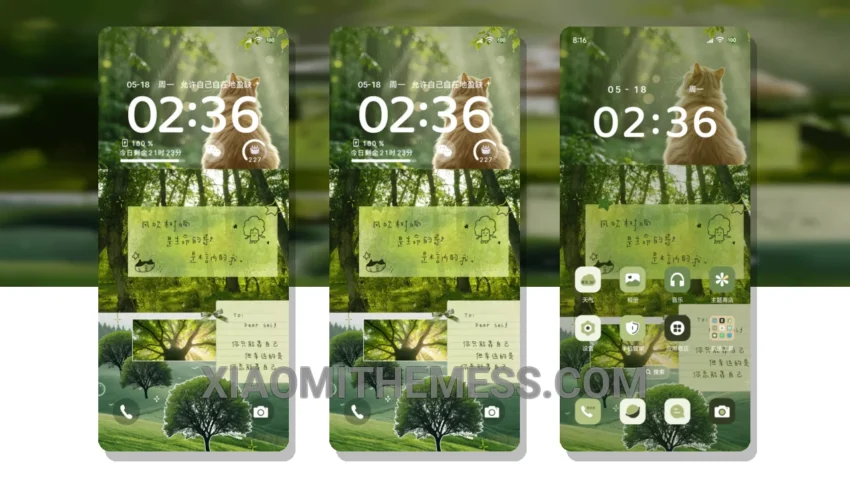
Green Mosaic Freedom is an amazing theme that completely transforms your Xiaomi phone’s interface. It’s like a breath of fresh air! The theme is fully compatible with HyperOS, MIUI 12, MIUI 13, and MIUI 14, so you don’t have to worry about compatibility issues.
The first thing you’ll notice is the stunning custom control center, which is redesigned to provide a seamless user experience. The theme also comes with a redesigned status bar that complements the overall aesthetic. And, with the icon pack integration, you can customize your icons to match your personal style.
This theme is perfect for those who love a clean and minimal interface. The pastel aesthetic themes and minimal vibrant design elements will make your phone stand out from the crowd. Plus, the theme supports dark mode optimization for a premium UI experience.
One of the best things about this theme is that it’s lightweight and battery-friendly. You don’t have to worry about battery drain or lag, as the theme is designed to provide a lag-free experience. The theme also supports 120Hz smooth animations for a seamless user experience.
In my testing, I found that the theme is very easy to apply and customize. The theme store provides clear instructions on how to apply the MTZ theme, and the process is relatively straightforward. However, one caveat is that the theme may not be suitable for those who prefer a more complex or feature-rich interface.
To be honest, I’m really impressed with the Green Mosaic Freedom theme. The combination of a clean interface, custom control center, and redesigned status bar makes it a must-have for any Xiaomi or Redmi phone user. So, if you’re looking for a theme that’s both stylish and functional, look no further than the Green Mosaic Freedom HyperOS theme!
Theme Information
🛠️ How to Install This MTZ Theme
- Download the MTZ file to your device.
- Open the official Themes app and go to your profile.
- Import & Apply the downloaded file.