
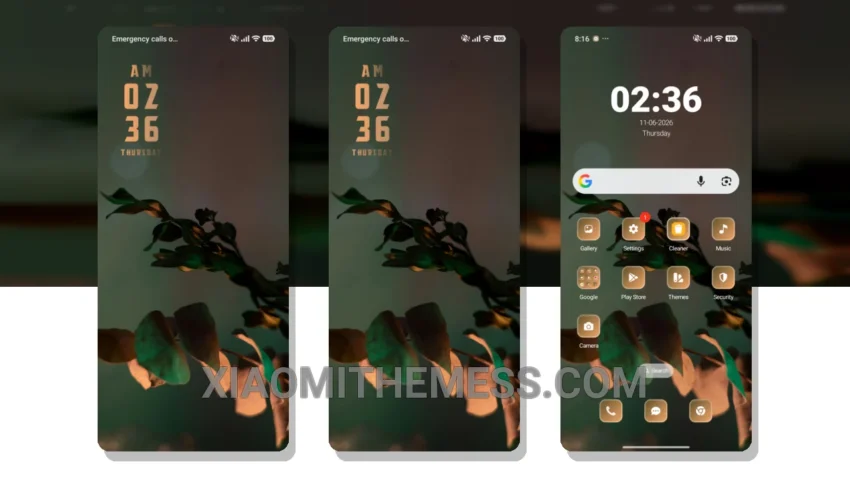
Dark mode is my jam. I mean, who needs a bright, eye-searing interface when you can have a sleek, dark mode optimized theme like the Green Plant theme? This theme is all about bringing a touch of nature to your Xiaomi device, with a unique minimalist twist.
The Green Plant theme is fully compatible with HyperOS, MIUI 12, MIUI 13, and MIUI 14, so you can enjoy a seamless and cohesive interface across all your devices. And with its dark mode optimization, you can save battery and reduce eye strain, which is a total win-win.
Customization Options
One of the best things about the Green Plant theme is its ability to customize. You can integrate your own icon packs, create a custom boot animation, and even personalize your control center to fit your personal style. Plus, the theme is designed to be lightweight and efficient, with no battery drain and a lag-free experience.
Of course, no theme is perfect, and one thing to note is that the Green Plant theme may not be as vibrant as some other themes on the market. But for me, the natural, earthy tone is a major plus, and the theme’s minimalist aesthetic is really on point.
To be honest, I’ve been using the Green Plant theme for a while now, and I’m totally in love with it. The way it brings a touch of nature to my device, the way it optimizes my battery life… it’s just a total winner in my book. So if you’re looking for a new theme to spice up your Xiaomi device, I’d definitely recommend giving the Green Plant theme a try.
Ready to experience the Green Plant theme for yourself? Simply download and install the theme, then go to the theme store and select the Green Plant theme to apply it. From there, you can start customizing and personalizing your interface to fit your unique style.
Theme Information
🛠️ How to Install This MTZ Theme
- Download the MTZ file to your device.
- Open the official Themes app and go to your profile.
- Import & Apply the downloaded file.