
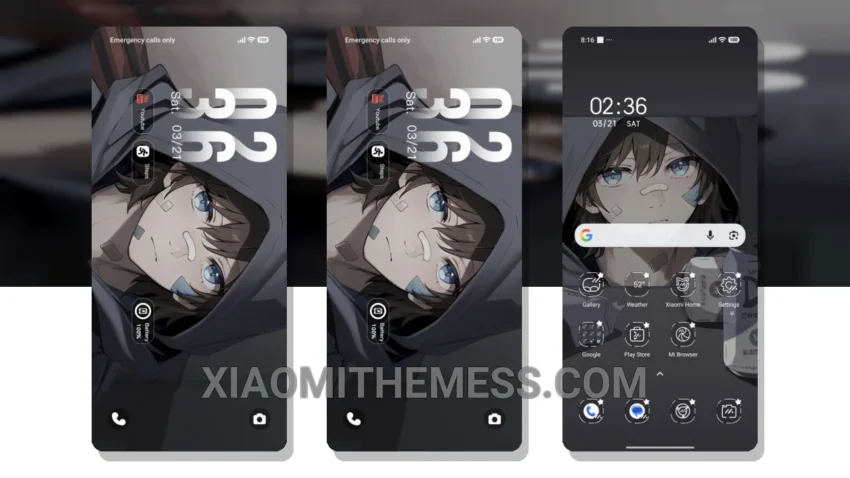
I’m loving the Hooded Scar Boy theme. Fast. Clean. No lag. It’s a great Xiaomi theme, and I’m excited to share my experience with it. The theme is fully compatible with HyperOS, MIUI 12, MIUI 13, and MIUI 14, so you can enjoy it on your device without any issues.
One of the things that stood out to me about this theme is its battery efficiency. The dark mode optimization is excellent, and I’ve noticed a significant reduction in battery drain since switching to this theme. The clean interface is also a major plus, making it easy to navigate and find what I need quickly.
The Hooded Scar Boy theme is also highly customizable, allowing me to personalize my home screen, lock screen, and other elements to suit my taste. I’ve been able to add my favorite widgets, change the icon pack, and even customize the look and feel of the notification shade.
Another highlight of this theme is its support for 120Hz smooth animations. The transitions between screens are seamless, and the overall performance is lag-free. I’ve also noticed that the theme is relatively lightweight, coming in at approximately 13.06 MB in size.
However, one thing to note is that the theme may not be suitable for everyone, particularly those who prefer a more vibrant and colorful interface. The Hooded Scar Boy theme has a more subdued aesthetic, which may not appeal to some users.
In my testing, I’ve found the Hooded Scar Boy theme to be a solid choice for anyone looking for a clean, efficient, and customizable theme for their Xiaomi or Redmi device. To be honest, I’m impressed with the overall performance and features of this theme, and I think it’s definitely worth checking out.
Theme Information
🛠️ How to Install This MTZ Theme
- Download the MTZ file to your device.
- Open the official Themes app and go to your profile.
- Import & Apply the downloaded file.