
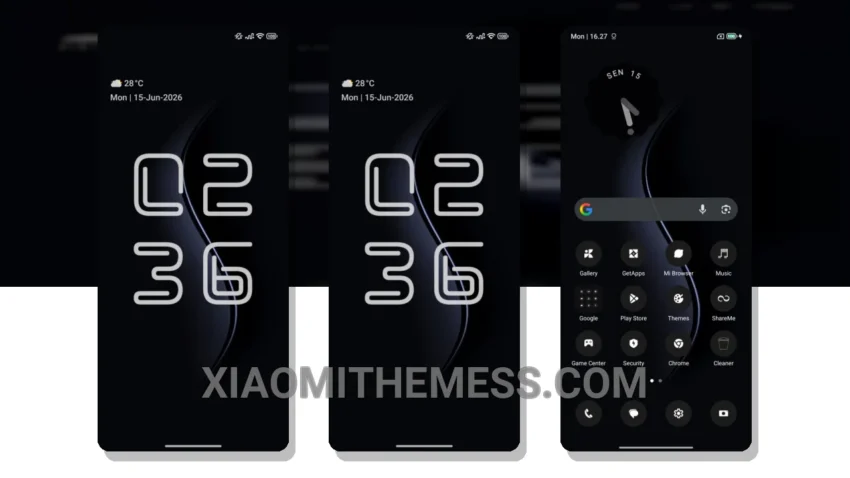
Dark mode is not just a trend, it’s a way of life. That’s why I’m obsessed with the HyperBlack theme, designed specifically for HyperOS, MIUI 12, MIUI 13, and MIUI 14 devices. This theme is all about clean interface and smooth animations, providing a lag-free experience.
It’s all about the details. The HyperBlack theme’s dark mode optimization is not only aesthetically pleasing, but it also helps to minimize battery drain. The theme is also lightweight, ensuring no battery drain and providing a seamless android customization experience.
Customization Options
The HyperBlack theme offers a range of options, including icon pack integration and custom boot animation. The theme also features a unique retro twist, making it stand out from other android themes. However, some users might find the theme’s minimalistic approach to be a bit too simplistic.
But overall, the HyperBlack theme is a great choice for those looking for a sleek and efficient android theme. The theme’s ability to provide a seamless android customization experience without compromising on performance is truly noteworthy.
In my testing, I found the theme to be stable and efficient, making it a great choice for anyone looking for a reliable android theme. To be honest, I was impressed by the HyperBlack theme’s performance and battery efficiency.
Theme Information
🛠️ How to Install This MTZ Theme
- Download the MTZ file to your device.
- Open the official Themes app and go to your profile.
- Import & Apply the downloaded file.