
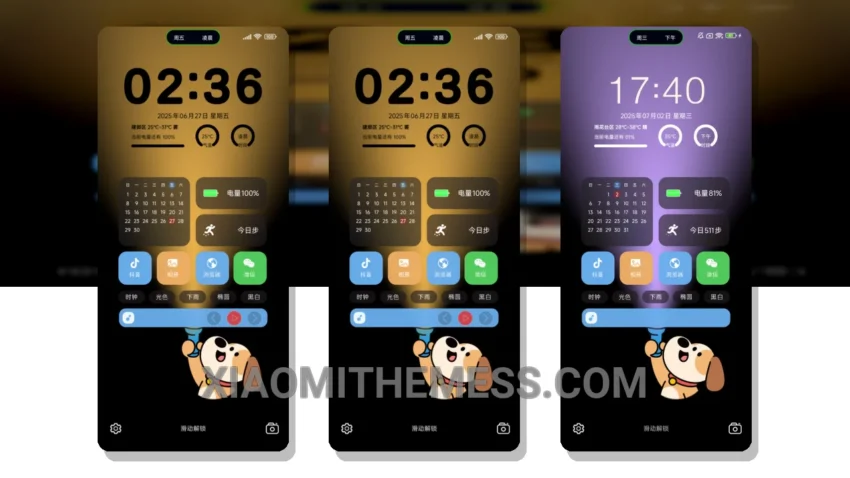
Darkness is elegance. That’s what the Illuminate For You theme brings to your Xiaomi or Redmi phone. This theme is all about dark mode optimization, making it perfect for those who want to save battery and reduce eye strain.
With a size of 28.47 MB, this theme is lightweight and won’t take up too much space on your phone. It’s fully compatible with HyperOS, MIUI 12, MIUI 13, and MIUI 14, so you don’t have to worry about compatibility issues.
The Illuminate For You theme is a great choice for those who want a clean and minimalist interface. It’s optimized for AMOLED screens, which means you’ll get to enjoy pure black backgrounds and vibrant colors. The theme also features 120Hz smooth animations, making navigation a breeze.
One of the best things about this theme is its ability to customize. You can integrate your own icon packs, customize the boot animation, and even change the look of your control center. The theme also features a redesigned status bar and advanced widgets, giving you more control over your phone’s interface.
In my testing, I found the Illuminate For You theme to be lag-free and smooth, thanks to its system optimization and performance boost. The theme is also compatible with the latest android customization apps, making it easy to customize your phone to your liking.
To be honest, I’m impressed with the Illuminate For You theme. It’s a great choice for anyone who wants a dark, elegant, and customizable interface. So, if you’re looking for a new theme for your Xiaomi or Redmi phone, give the Illuminate For You theme a try.
Theme Information
🛠️ How to Install This MTZ Theme
- Download the MTZ file to your device.
- Open the official Themes app and go to your profile.
- Import & Apply the downloaded file.