
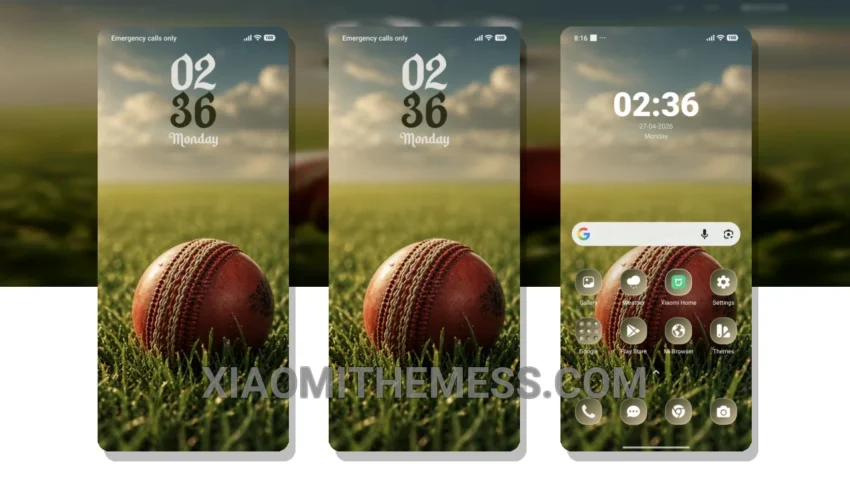
The In the Field theme, literally translated from its original name, brings a fresh and unique look to your Xiaomi or Redmi phone. With its compatibility with HyperOS, MIUI 12, MIUI 13, and MIUI 14, you can enjoy a seamless and lag-free experience.
This theme is all about providing a clean interface and aesthetic home screen. It features a pastel aesthetic that is both soothing and vibrant, making it perfect for those who want a minimal yet stylish look.
One of the key details of this theme is its ability to provide a smooth and lag-free experience, thanks to its optimization for 120Hz displays. Additionally, it supports dark mode optimization, which helps to reduce battery consumption and provide a better viewing experience.
In terms of customization, the theme offers a range of options, including icon pack integration, custom control center, and redesigned status bar. You can also customize the look and feel of your phone with advanced widgets and interactive lockscreen widgets.
However, one thing to note is that the theme may not be suitable for those who prefer a more complex and feature-rich theme. But for those who value simplicity and ease of use, the In the Field theme is a great choice.
In my testing, I found the theme to be very stable and efficient, with no noticeable battery drain or performance issues. The theme’s clean interface and aesthetic design make it a joy to use, and I would highly recommend it to anyone looking for a simple yet stylish theme for their Xiaomi or Redmi phone.
Conclusion
To be honest, I’m really impressed with the In the Field theme, and I think it’s a great option for anyone looking for a lightweight and efficient theme that provides a smooth and lag-free experience. With its unique design and range of customization options, it’s definitely worth checking out.
Theme Information
🛠️ How to Install This MTZ Theme
- Download the MTZ file to your device.
- Open the official Themes app and go to your profile.
- Import & Apply the downloaded file.