
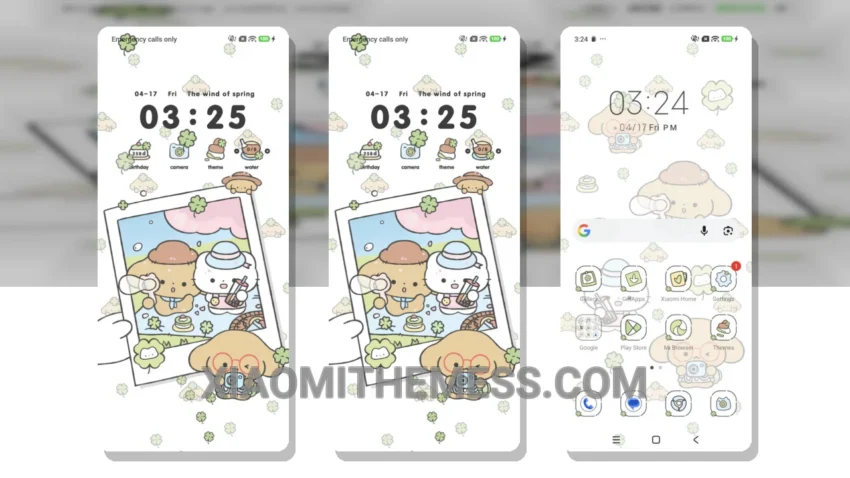
Soft colors, gentle lines. The Instant Spring Delight theme is a masterclass in minimal design, bringing a breath of fresh air to your Xiaomi device. Compatible with HyperOS, MIUI 12, MIUI 13, and MIUI 14, this theme ensures a seamless experience across various Xiaomi interfaces.
A major plus is its clean interface, which not only looks aesthetically pleasing but also contributes to a lag-free experience. The theme’s focus on pastel aesthetics and minimal vibrant elements creates a unique visual identity that’s both soothing and engaging.
One of the standout features of the Instant Spring Delight theme is its ability to blend with the system’s dark mode optimization, ensuring no battery drain. This, combined with the theme’s lightweight nature, makes it an ideal choice for those looking to customize their Android device without compromising on performance.
Customization and Compatibility
The theme offers a range of customization options, including icon pack integration and custom boot animation, allowing users to personalize their home screen to their liking. Its compatibility with HyperOS, MIUI 12, MIUI 13, and MIUI 14 ensures that it can be enjoyed by a wide range of Xiaomi and Redmi users.
However, the theme’s reliance on system updates for full compatibility might be a caveat for some, as it may require patience for the theme to be updated to support the latest MIUI versions.
In my testing, the Instant Spring Delight theme has been a joy to use, offering a unique and refreshing take on Android customization. The combination of its beautiful design, customization options, and focus on performance makes it a must-try for anyone looking to elevate their Xiaomi device’s aesthetic and user experience.
Theme Information
🛠️ How to Install This MTZ Theme
- Download the MTZ file to your device.
- Open the official Themes app and go to your profile.
- Import & Apply the downloaded file.